

Build your product. Keep your time.
Your next business application should begin with your idea—not weeks of rebuilding the infrastructure around it. Hero brings business modules, reusable engineering foundations and practical automation into one evolving ecosystem.
Whether you are building a SaaS product, delivering a client portal or organizing an internal operation, the same hidden work keeps returning: users, access rules, company boundaries, forms, tables, files, queues, approvals, exports and history. Hero is designed to give that work a reusable home, so you can spend more time on the part of the product that creates value.
PHP and Vue are the current foundation. Node.js, Python and React are the next expansion paths. Your support helps harden the existing platform, improve documentation, prepare a source release and build those future editions through explicit milestones.
Hero at a glance: the capabilities behind the head start
Explore the essentials first, then the detailed tour below. Hero combines 24 business and operational modules with a shared platform layer. These are connected capabilities, not 24 unrelated applications you have to wire together yourself.
- Sign-in and identity: QR-code login approved from an authenticated device, password authentication, passkeys/WebAuthn, MFA/TOTP, recovery codes, account recovery and tenant-controlled registration.
- Sessions and access: active-session visibility, device identification, individual or other-session revocation, trusted-device controls, roles, granular permissions, step-up confirmation and temporary delegated access.
- Multi-company operations: a Central control plane, organization domains, tenant-specific users and data, module enablement, plans, quotas, branding and regional preferences.
- Live collaboration: direct and group chat, department channels, attachments, reactions, read state, typing and presence, supported by private WebSocket channels.
- Daily work: task boards, checklists, assignments, dependencies, deadlines, time entries, a personal Work Inbox and auditable approval decisions.
- Commercial operations: leads, opportunities, quotes, customers, sellers, orders, payments, shipments, returns, targets and commissions.
- Finance and purchasing: receivables, payables, installments, wallets, transfers, cost centers, allocations, reconciliation records, suppliers and purchasing workflows.
- People, projects and service: HR records, attendance and leave; projects, portfolios, risks and budgets; contracts and renewals; helpdesk queues, SLA tracking and knowledge articles.
- Content and files: editorial publishing, taxonomy, moderation, scheduled posts, authenticated media storage, folders, previews, attachments and trash.
- Data and accountability: mapped bulk imports, row validation, background processing, tracked rollback, audit history, report previews, sharing, schedules and CSV delivery.
- Automation and media: code and visual browser flows, generic loops and external data, reusable browser projects, reading/video lists, media preparation and assisted publishing.
- A reusable application shell: permission-aware navigation, administrative forms and tables, themes, localization, feedback, dashboards and shared developer contracts.
The sections below distinguish implemented foundations from previews, provider-dependent integrations and future work. Funding strengthens an existing codebase; it does not turn every roadmap item into a completed production service.
A visual tour of the real product: this presentation includes 22 authentic interface captures, alongside the explanatory diagrams. New captures use the English locale and show configuration screens, empty states, seeded demonstration records and focused editors. Organization names and original test content retain their original spelling. These are development examples, not customer results or adoption metrics.
What you are helping build
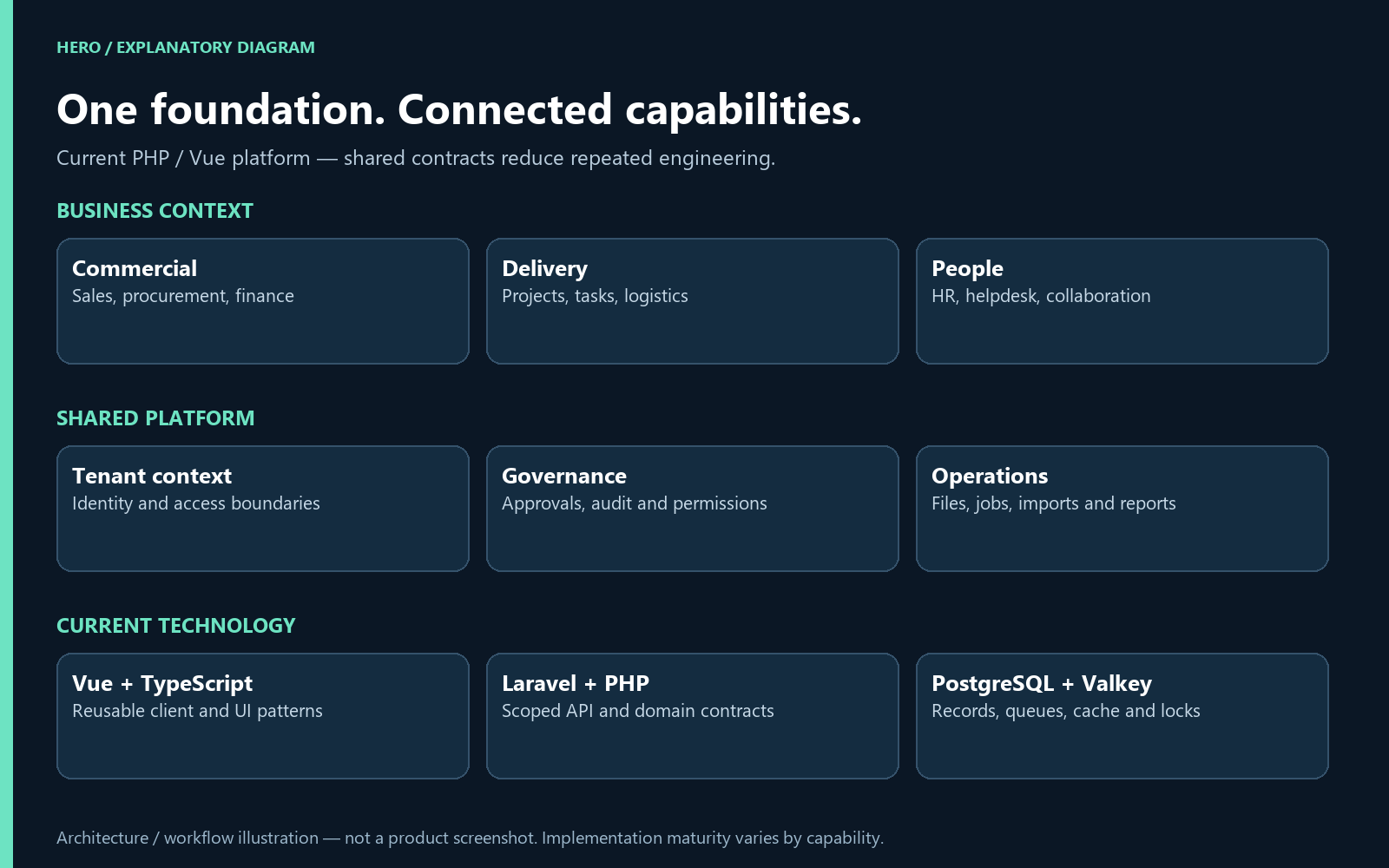
Architecture diagram: the current shared platform and technology foundation. Explanatory illustration, not a product screenshot.
- A business foundation: connected modules for commercial work, operations, finance, people, projects and collaboration.
- A developer head start: reusable contracts for tenant context, permissions, administrative UI, files, audit, jobs and realtime updates.
- An automation workbench: code and visual flows, external data, loops and controlled local capabilities.
- An expanding ecosystem: additional language/framework editions and portable project applications, developed in measurable stages.
Where the time savings come from
A new approval screen is rarely only a screen. It needs authorized records, validation, tenant isolation, comments, supporting files, concurrent-change handling, notifications, history and tests. A bulk import also needs mapping, row errors, progress, recovery and traceable outcomes. Rebuilding those patterns for every brief can consume days before the unique business requirements are addressed.
Hero lets related modules share those foundations. Agencies can reuse a coherent starting point across projects. Founders can focus on their business model. Operational teams can follow the same work across records, tasks, approvals and files. Creators can turn a repeated browser routine into a reviewed, data-driven flow.
The goal is to save days of repeated engineering and manual work. The campaign does not claim a measured universal productivity benchmark; the benefit depends on your scope, integration and adoption. The concrete advantage is the reusable implementation you start with.
Identity and access: much more than a login form
QR-code login with an approval flow
Open the login screen on a new device, scan its QR code from a device where you are already authenticated, and approve the sign-in there. The original screen consumes the approved challenge and creates its own session. The implementation uses a short-lived challenge, checks the requesting host and records approval and consumption in Audit.
Why it matters: developers can build cross-device entry around an existing identity workflow rather than inventing a QR protocol from scratch. QR login still respects account status, organization boundaries and the application's authentication policies.
Passkeys, MFA and recovery
- Passkeys/WebAuthn: registration, listing, removal and sign-in through compatible authenticators such as Windows Hello, biometrics, PINs or security keys. Availability depends on HTTPS, browser/authenticator support, relying-party configuration and allowed origins.
- MFA: TOTP enrollment and verification, recovery codes and requirements driven by roles or tenant policy.
- Account lifecycle: password rules, progressive login throttling, active-account checks, recovery paths and audit events for sensitive authentication changes.
- Tenant-controlled registration: enable or disable public signup, require moderation, choose the permitted starting role and govern phone/email-verification requirements. Social-login settings do not imply that every external identity provider is integrated.
Sessions you can see and revoke
The session workspace shows device/browser information, origin, last activity, expiration and the current-session marker. Users can name a session, revoke one session or end other sessions while preserving their current one. Revocation also addresses the associated access and refresh tokens.
Trusted-device records can be reviewed, named, trusted or revoked. Sensitive trust changes use recent step-up verification, and revoking a device also revokes matching sessions. Risk information and recommended actions provide context; they are not presented as a guarantee that every threat will be detected.
Permissions, temporary access and account switching
- Role presets and granular permissions shape available routes, actions and resources. Administrators can clone a supplied role preset for controlled customization.
- Temporary grants carry an explicit user, scope, permission set, justification and expiration, with separate approval and revocation records.
- Step-up confirmation protects supported sensitive decisions, such as approval actions and trusted-device changes.
- Central-to-organization account switching uses an explicit short-lived, destination-bound handoff instead of copying login tokens between browser domains.
Multi-tenancy: one platform, separate organization contexts
Central is the platform control plane; each tenant is an organization's operational context. Central governs the tenant catalog, domains, module availability, plans, quotas, role/settings presets, branding, lifecycle and readiness. Organization users work inside their own domain with their own records and permissions.
- Organization identity: domain-based context resolution, organization-specific navigation and the correct Central/tenant destination after account switching.
- Business boundaries: linked records, participants, files, exports and resource actions are checked against the active organization rather than trusting an editable tenant identifier sent by the browser.
- Commercial governance: module enablement and contracted limits can vary by tenant, so one deployment can support different operational packages.
- Lifecycle: onboarding, offboarding, archiving, reactivation and portability have administrative contracts and auditable actions.
- Local identity: tenant name, logo, colors, language, timezone, currency and regional defaults can follow allowed governance settings.
Architecture detail: the current edition uses a shared PostgreSQL database with logical isolation by tenant. Separate physical databases per organization are not claimed as a current capability.
WebSockets and realtime: keep the workspace in step
Hero uses Laravel Reverb broadcasting and a frontend realtime subscription layer to deliver supported changes through private channels. Channels distinguish personal users, tenant resources and platform resources; subscription authorization applies context and resource permissions.
- Chat: messages, edits, deletions and typing updates can appear without repeatedly refreshing the conversation. Presence is renewed separately.
- Tasks: board, column, card movement, membership, checklist, comment and time-entry events support a shared operational view.
- Background work: persisted runs publish lifecycle/progress events, with polling as a recovery fallback where implemented.
- Business resources: supported editorial, helpdesk, store-request and other resource events update the relevant workspace in context.
Why it matters: the same event and authorization foundation can be reused across modules. WebSockets complement persisted API records; they do not replace validation, permissions or recovery after a connection drops. Production delivery depends on configuring and operating the realtime service.
Collaboration: conversations connected to the work
Chat supports direct conversations, groups and team/department channels inside the active context. Participants come from that context; Central and organization conversations are not merged into a shared, unrestricted room.
- Messages with emoji, reactions and attachments from the authenticated media manager.
- Typing indicators, presence, read state and unread counters for quick orientation.
- Paginated search, author editing and moderation workflows.
- Documented export, retention and legal-hold controls for accountable communication; configuration and operational acceptance still matter.
- Shared media references and auditable changes help keep conversations connected to their supporting evidence.
For example, a team can discuss an operational issue, attach a file, assign the work on a task board and follow the associated change through notifications and history, using common platform building blocks.
A complete module tour
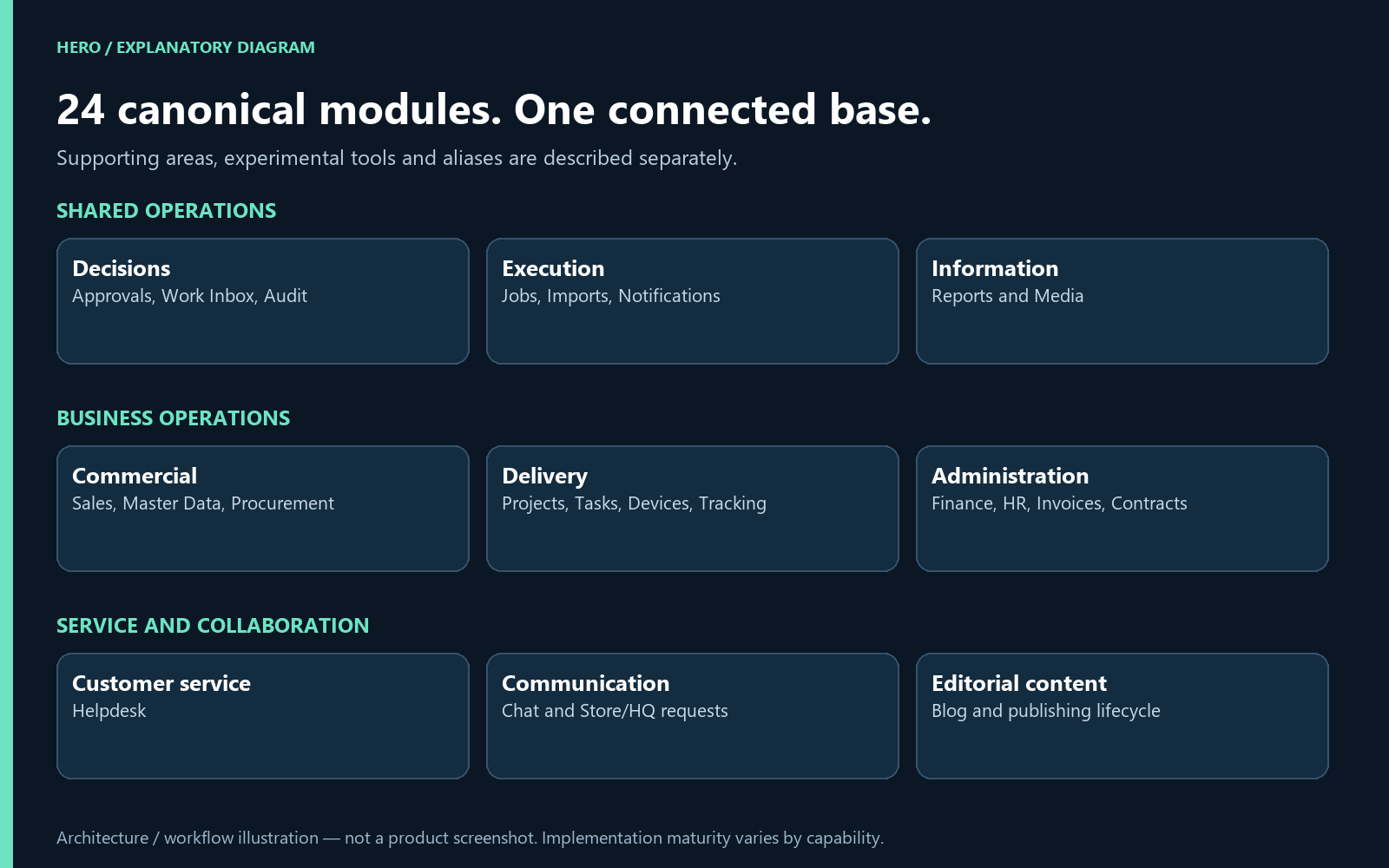
Module map: all 24 canonical modules grouped by the work they support. Explanatory illustration, not a product screenshot.
The current backend manifest declares 24 canonical modules. Below, each module has a job, a practical benefit and a clear boundary. Shared platform areas and companion tools are listed separately, so aliases and preview interfaces are not counted as extra finished modules.
Current implementation means source and contracts exist. Preview means incomplete operational proof. Roadmap means future work. This is an actively developed product; provider and business-flow acceptance are tracked separately from interface availability.
Shared operations
Notifications
Keep changes visible without checking every screen.
- Persistent notices and unread states.
- Personal delivery preferences.
- Read, archive and restore workflows.
- Realtime and email delivery contracts.
- Context-aware notification access.
In practice: An assigned user can distinguish new notices from items already handled, archive a notice and restore it later. Personal preferences and active-context access make the feed useful without turning it into a company-wide information leak.
Development focus: Validate delivery behavior under worker outages; Finish channel-specific delivery and preference tests.
Security and sessions
Give the right people the right access, and retain control when access changes.
- Active sessions with device and browser context.
- Targeted session revocation.
- Revoke other sessions while preserving the current one.
- Credential-vault and access-review capabilities.
- Dedicated permissions and step-up patterns.
In practice: After signing in on a shared machine, a user can identify that session and revoke it from another device. The current session remains identifiable, so “sign out elsewhere” does not need to disrupt the session being used to review access.
Development focus: Complete credential-vault adoption by every integration; Verify recovery, privilege boundaries and access reviews across tenants.
Background jobs
Make long-running work observable instead of leaving users waiting.
- Persistent runs and event histories.
- Progress, results and failure details.
- Retry and cancellation contracts.
- Realtime updates with polling fallback.
- Shared queue integration for imports and exports.
In practice: An import, export or media operation can retain its own progress, result and history. A supported retry creates a new execution linked to the original; availability depends on a producer that can safely reconstruct the work. Pause, priority and rescheduling currently have pre-start restrictions.
Development focus: Exercise worker-failure and recovery scenarios; Validate queue capacity, retention and cancellation under load.
Approvals
Replace decisions hidden in messages with a traceable approval process.
- Policies, thresholds, stages and delegated decisions.
- Requester, priority, origin and deadline context.
- Justification and step-up for sensitive decisions.
- Self-approval protection and concurrent revision checks.
- Store/HQ request adapter and module-governance flows.
In practice: A store request reaches its authorized approver with the origin, justification, supporting evidence and deadline attached. The recorded decision returns through its explicit adapter to the originating workflow instead of merely changing a local badge.
Development focus: Add and validate explicit adapters for additional business domains; Test substitution, overdue decisions and concurrent approvals.
Work Inbox
See assigned work and next actions in one permission-aware place.
- Server-backed task and approval aggregation.
- Search, origin, state, priority, overdue and team filters.
- URL-preserved views, sorting and pagination.
- Optimistic revision on quick transitions.
- Private realtime channel contracts.
In practice: A person can find their overdue tasks across connected sources without opening each module. Filters stay in the URL, and quick transitions use the server revision so conflicting changes can reload the latest record.
Development focus: Expand connected work sources only through scoped backend adapters; Validate cross-module reconciliation and stale-item behavior.
Data imports
Bring existing records into the product with reviewable results.
- Source files in authenticated media storage.
- Column mapping, normalization and pre-validation.
- Asynchronous batch execution with progress.
- Per-row errors and idempotency.
- Tracked-record rollback and auditable outcomes.
In practice: Map an incoming file, review validation errors, execute the accepted batch and inspect its row-level results. Tracked rollback targets the changes the import recorded; it is not an unrestricted “undo everything” operation.
Development focus: Publish documented import recipes and examples; Exercise large-file limits, partial failures and rollback constraints.
Audit trail
Understand who changed a record, in which context, and when.
- Actor, target, action and timestamp records.
- Context-aware filtering and access.
- Sensitive-operation history.
- Integration with administrative and business actions.
- Append-only/verifiable event patterns in the governance foundation.
In practice: Review a sensitive change by actor, action, context and period, then connect it to the affected resource. Audit supports investigation and accountability; it does not replace an organization's retention, backup or incident-response procedures.
Development focus: Complete critical-event coverage across every integrated flow; Validate retention, export and investigation procedures.
Reports and scheduled exports
Turn operational data into repeatable, permission-aware reporting.
- Validated report definitions and approved source dictionary.
- Preview, favorites, private/public and explicit sharing.
- Daily, weekly and monthly schedules.
- CSV deliveries through the media manager.
- Tenant filters, sensitive-field restrictions and delivery metadata.
In practice: Prepare a report once, share it with the intended audience and schedule repeat CSV deliveries. Server-side tenant filters and approved-source restrictions are reapplied during execution rather than relying on a filter left selected in the browser.
Development focus: Validate large exports and scheduling failures; Expand approved source coverage and improve business-oriented report recipes.
Business modules
Devices and vehicles
Keep operational assets connected to the people and processes using them.
- Types, manufacturer/model and serial inventory.
- Assignments to users, sectors and vehicles.
- Heartbeat, last-use and online context.
- Pairing, revocation and operational authorization contracts.
- Reader, phone, tablet, printer, terminal, scale and tracker categories.
In practice: Register the operational device, associate it with a person or vehicle and follow heartbeat and authorization state. Hardware categories are useful inventory and integration contracts; real readers, printers and trackers still require compatible, tested adapters.
Development focus: Validate individual hardware/bridge adapters on real devices; Complete mobile-agent, lost-mode and offline acceptance scenarios.
Scope note: A supported catalog category is not a guarantee that every physical device or browser hardware API has been tested.
Delivery tracking
Follow an order from fulfillment to delivery evidence.
- Shipments linked to sales orders.
- Picking, packing, shipping, route and delivery lifecycle.
- Status history and tracking API.
- Vehicle/tracker links, customer portal and realtime updates.
- Operational map/ETA surface and photo/signature media-proof requirements.
In practice: A shipment can move from picking through delivery while accumulating status events and supporting media. Customer visibility and operational evidence share the shipment record; live mobile-agent and map-provider acceptance remain separate work.
Development focus: Validate a real mobile agent and external map configuration; Exercise complete order-to-delivery, failure and return cycles.
Master data
Reuse customer, supplier and reference records across departments.
- People, companies, contacts and addresses.
- Organization units and memberships.
- Catalogs, categories and units of measure.
- Price lists, banking and fiscal reference records.
- Dedupe/merge foundations, scoped selectors and history.
In practice: Reuse the same person or company across commercial and operational records instead of creating a new customer-shaped copy in each department. Contacts, addresses, roles and duplicate review help maintain consistent references.
Development focus: Broaden import and merge acceptance examples; Validate duplicate resolution and sensitive-field policies across consumers.
See it in the product
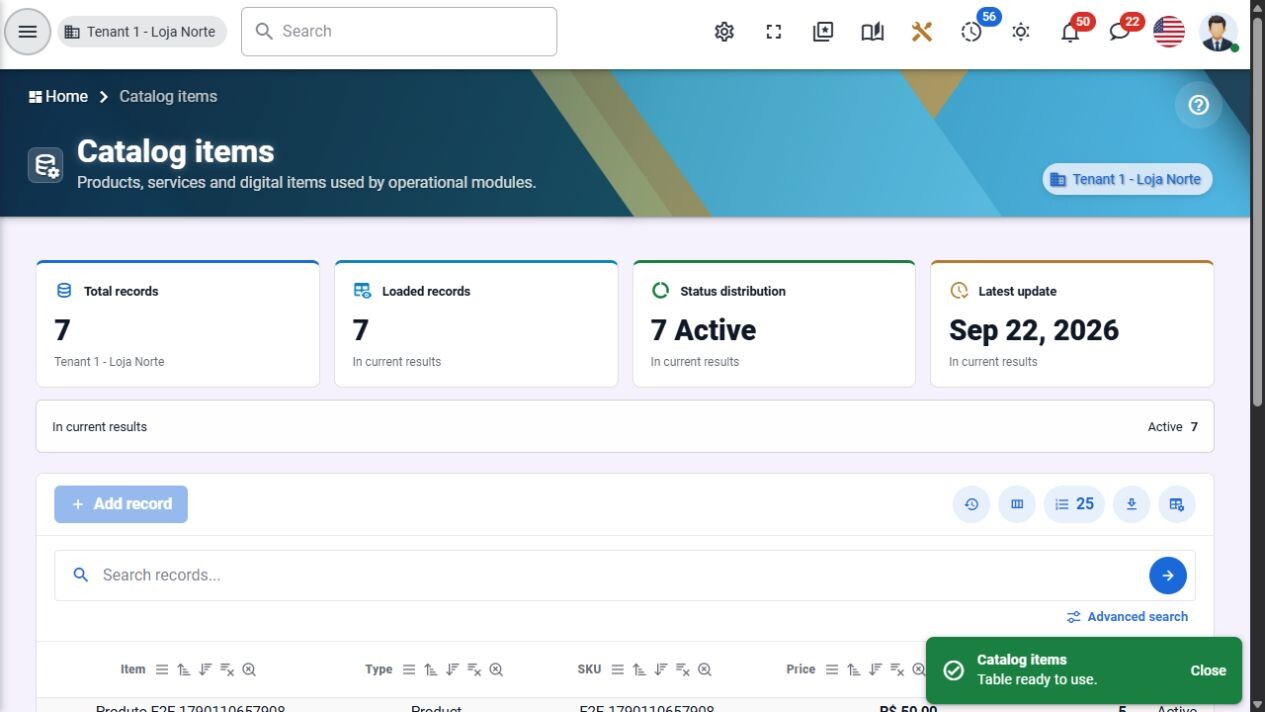
Master data: reusable catalog items. English interface, development demonstration.
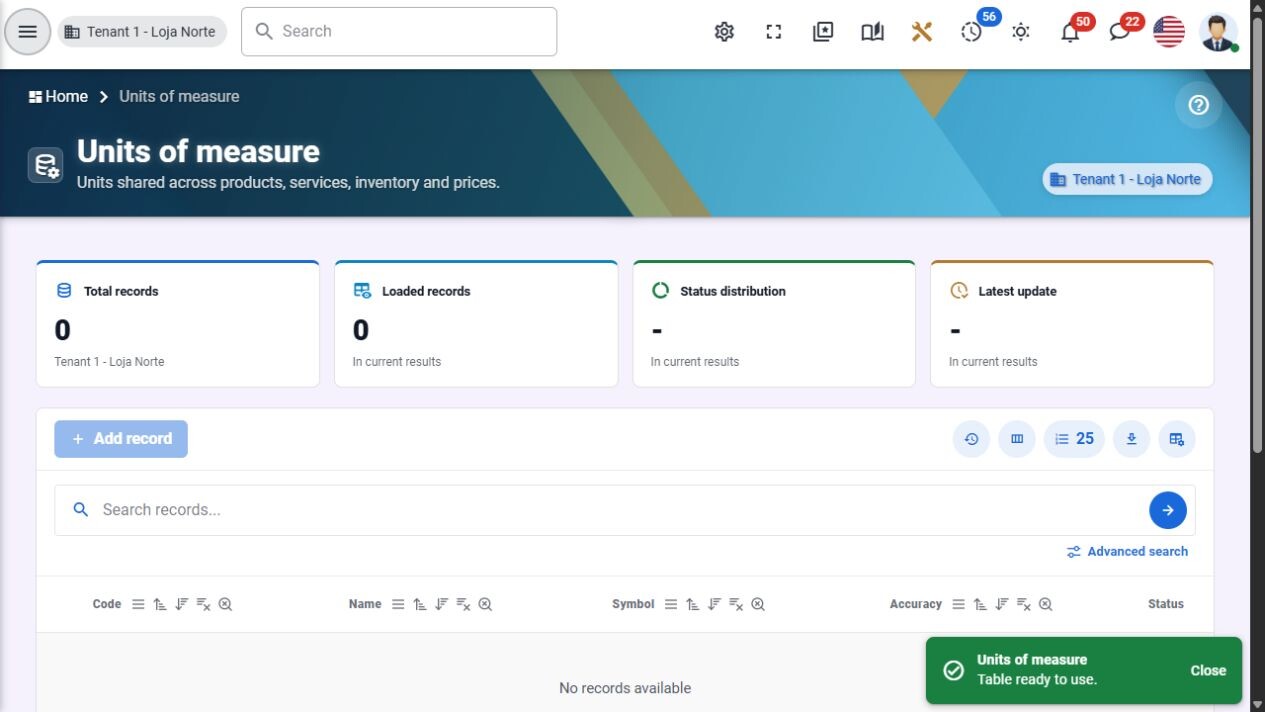
Master data: reusable units of measure. English interface, development demonstration.
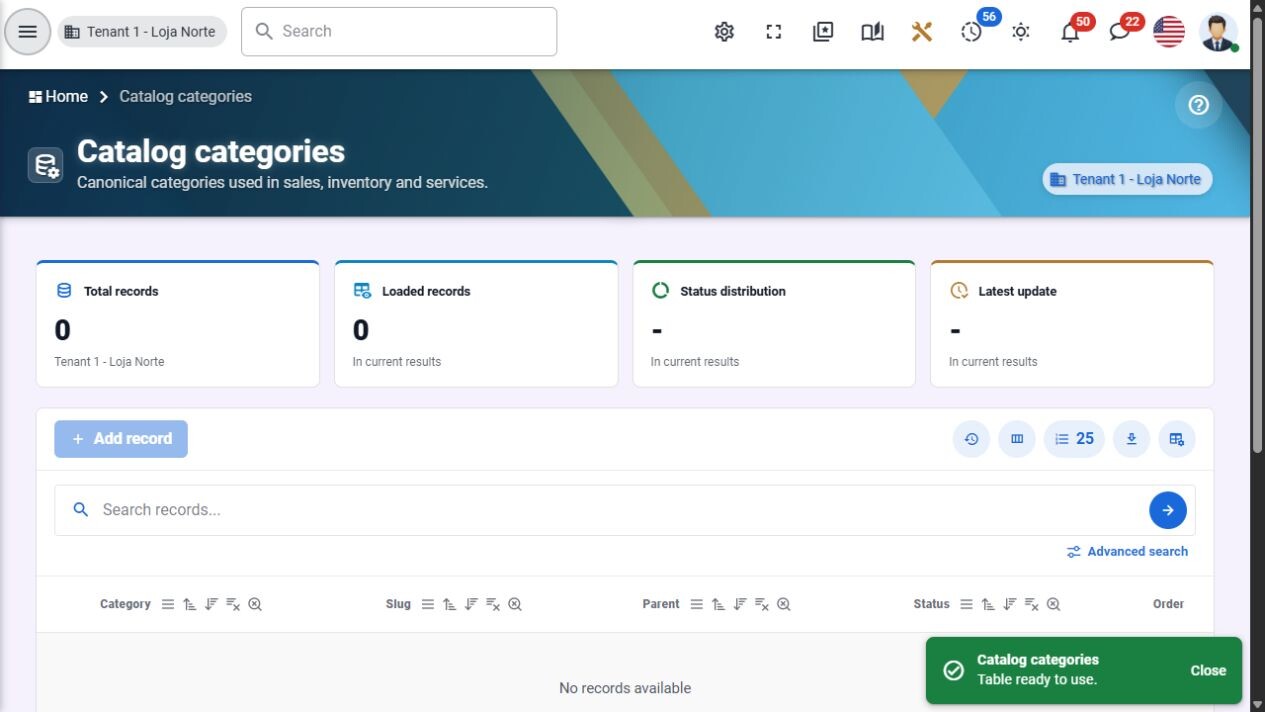
Master data: shared catalog classification. English interface, development demonstration.
Procurement
Keep purchasing decisions and receiving records attached to their business context.
- Supplier registration and status.
- Purchase orders and line items.
- Receiving records and supporting document links.
- Approval thresholds and traceable cancellation/history.
- Integration contracts with master data, finance, inventory and invoices.
In practice: Keep the supplier, order lines, receiving records and supporting documents together. The implemented purchasing foundation can grow into the documented RFQ and three-way-matching journeys as those integrations are completed and accepted.
Development focus: Complete and validate RFQ/comparison and three-way-match journeys; Run purchase-to-receipt-to-pay operational acceptance.
Scope note: RFQ and three-way matching appear in the product scope; the canonical resource manifest alone does not prove those complete workflows.
Tasks and planning
Keep responsibilities, dependencies and deadlines visible to the team.
- Boards, custom columns and Kanban/table/calendar views.
- Assignees, participants, reviewers and priorities.
- Dates, recurrence, snooze, labels and dependencies.
- Checklists, comments, media attachments and history.
- Estimated/spent time and time-entry foundations.
In practice: Turn a responsibility into a board card with assignees, priority, dates, checklist, comments and attachments. Record time against the work and observe supported realtime changes when colleagues move or update a card.
Development focus: Validate recurring schedules, dependency cycles and team permissions; Finish keyboard/mobile, timeline and planning acceptance.
Sales, CRM and inventory
Connect the commercial journey from first contact to order follow-up.
- Leads, opportunities, pipelines, stages and activities.
- Products, categories, customers and sellers.
- Quotes, orders, payments, shipping and returns.
- Inventory records, reservations, targets and commissions.
- Authenticated customer portal and commercial history.
In practice: Follow a lead into an opportunity or quote, then an order with its responsible seller, payment and shipment context. Manager, seller, customer and logistics views serve different roles; complete inventory, fiscal and finance journeys require the integration acceptance described here.
Development focus: Validate committed inventory and complete financial/fiscal integration; Run order-to-cash, returns and delivery acceptance with realistic exceptions.
See it in the product
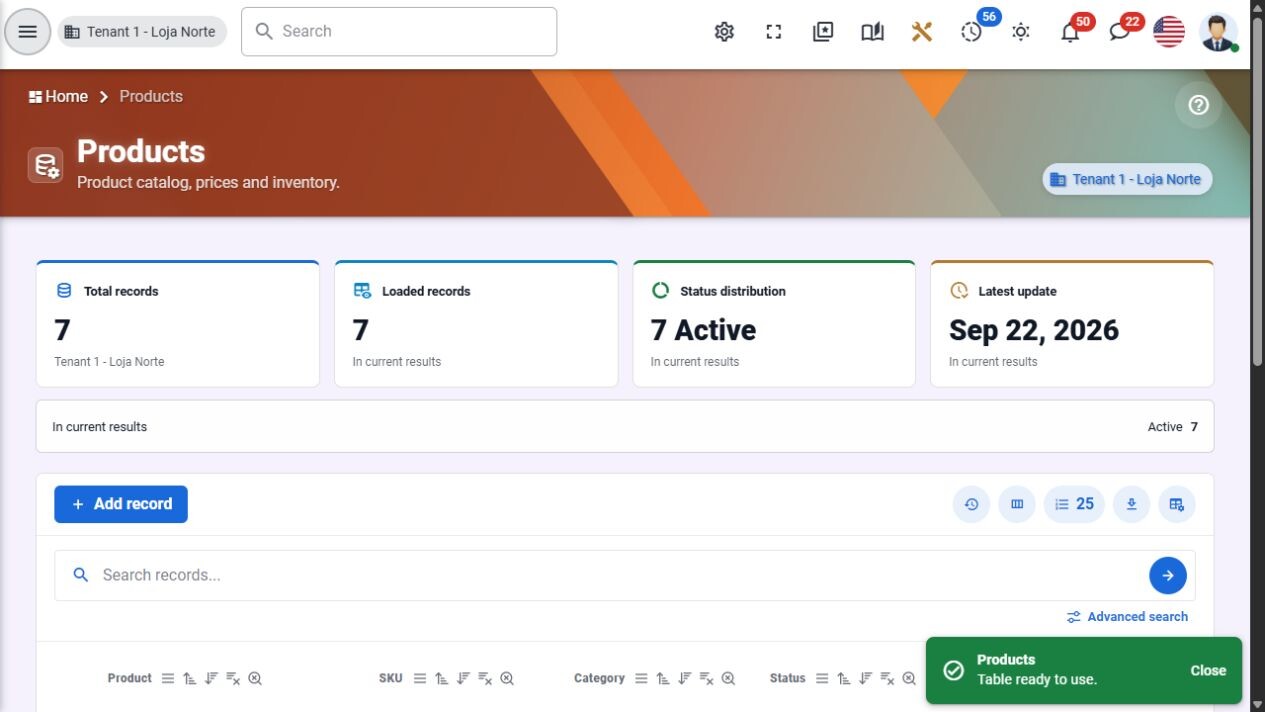
Sales: products, prices and inventory. English interface, development demonstration.
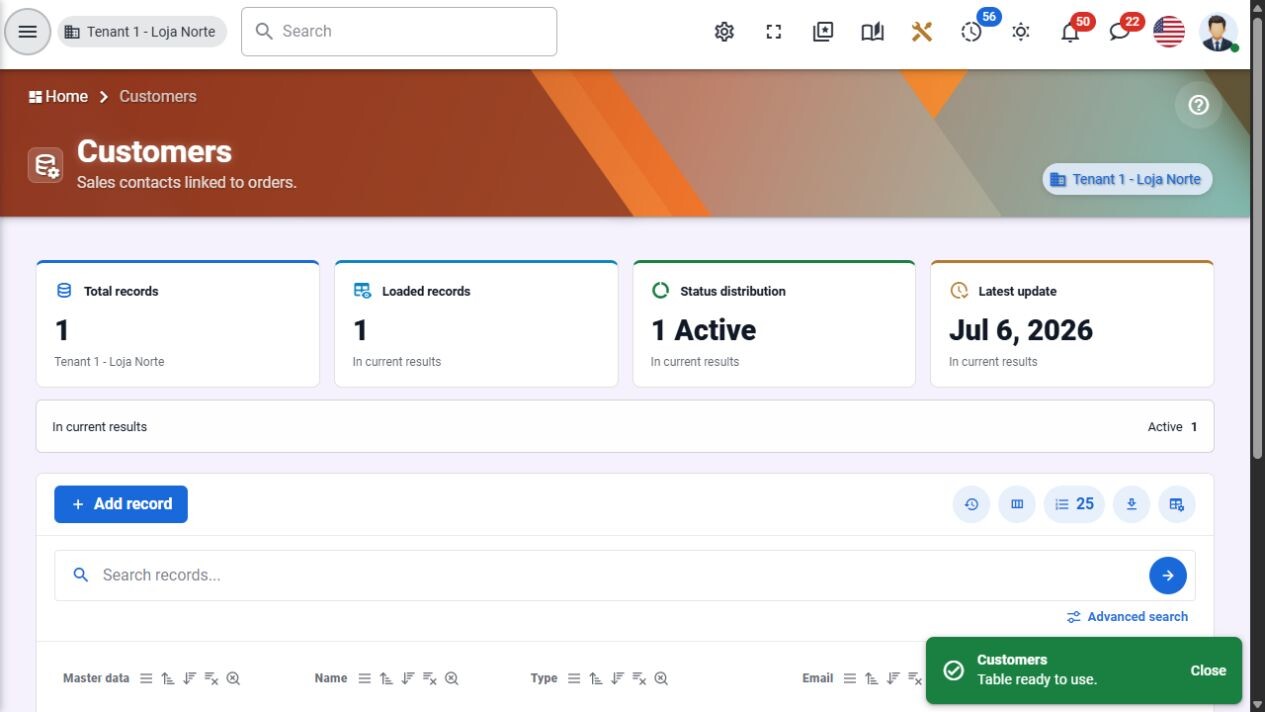
Sales: customer records. English interface, development demonstration.
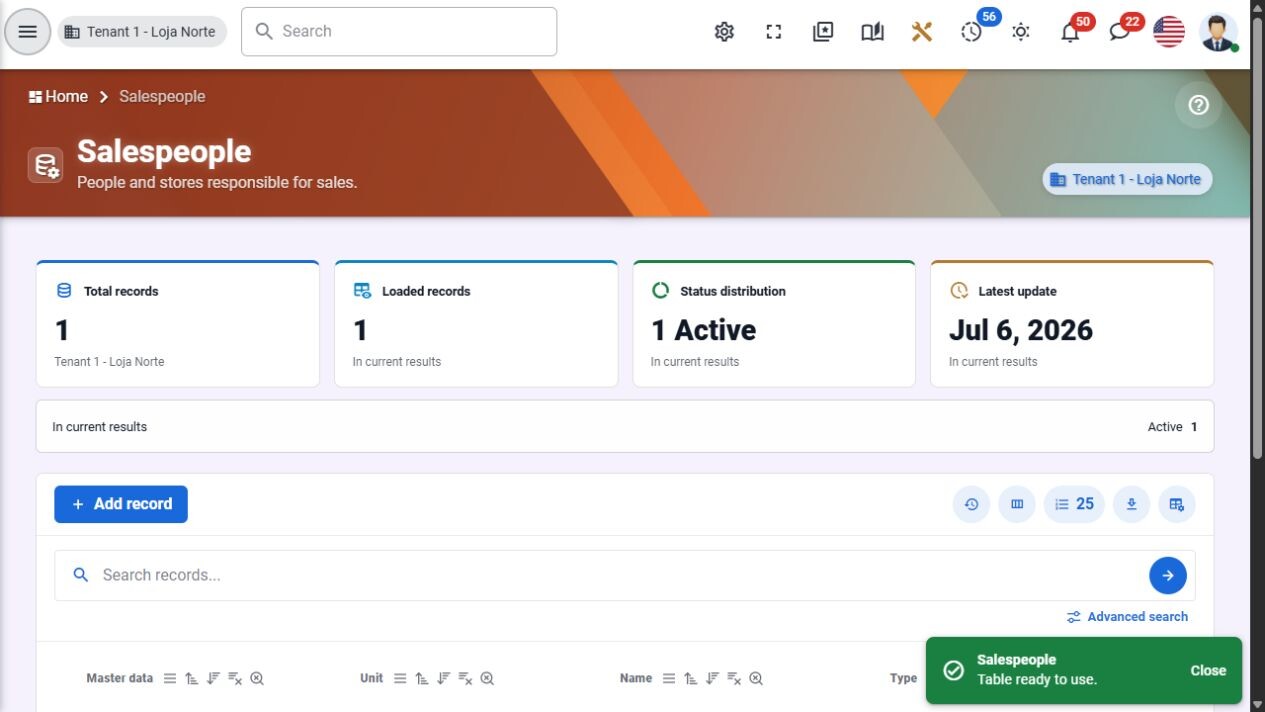
Sales: sellers and commercial responsibility. English interface, development demonstration.
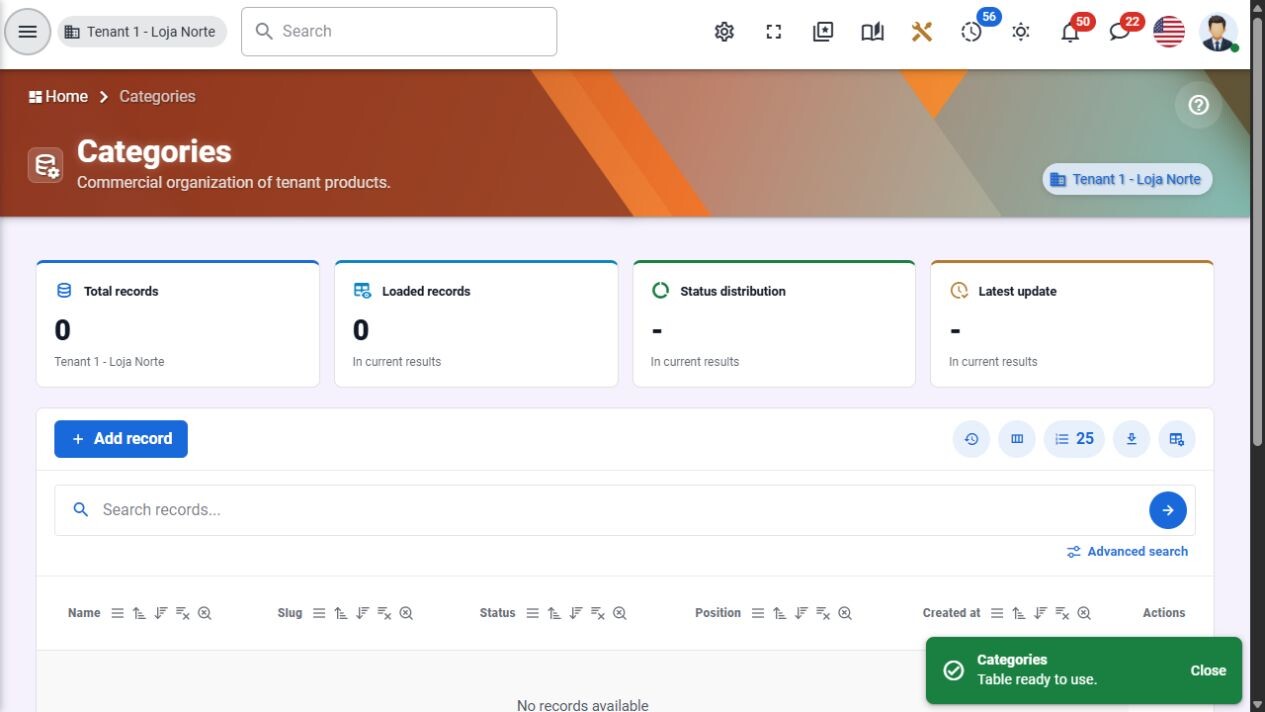
Sales: commercial product categories. English interface, development demonstration.
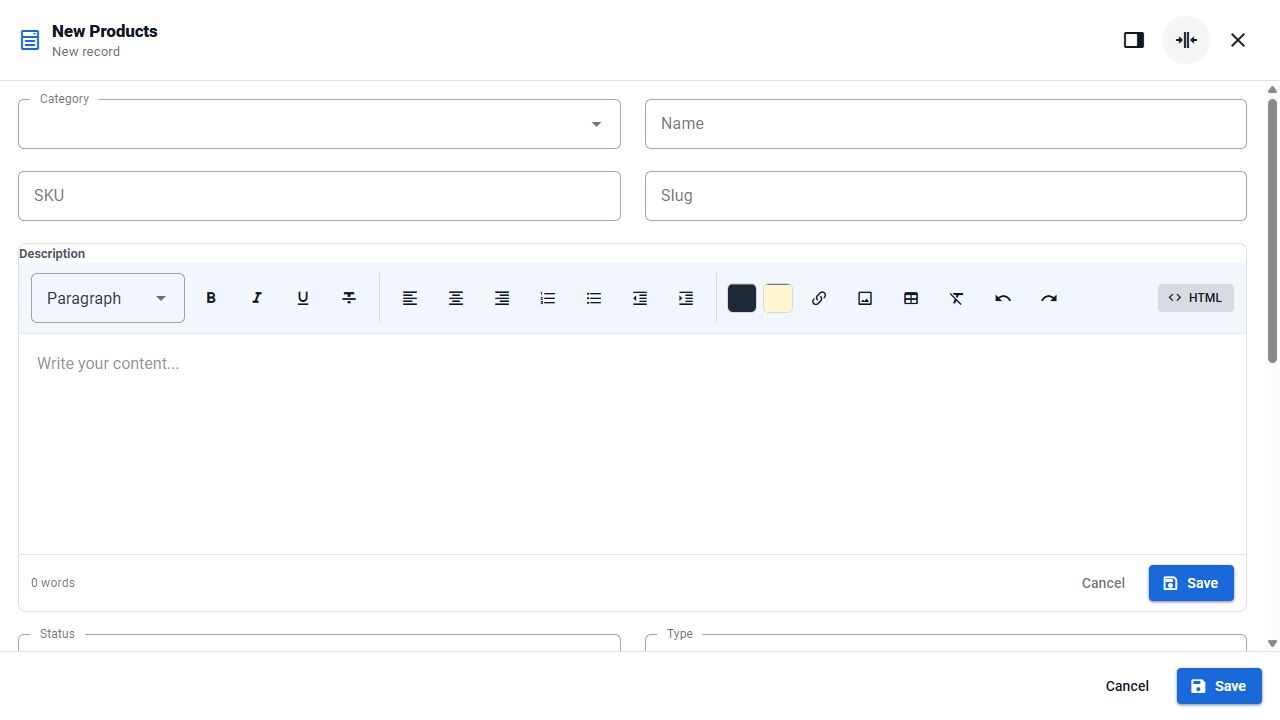
Sales: product editor with rich-text description. English interface, development demonstration.
Human resources
Organize people operations while protecting sensitive employee information.
- Employees, departments, positions and employment records.
- Contracts and documents with protected media links.
- Attendance, leave and benefits.
- Recruitment and onboarding workflows.
- Performance cycles, goals, feedback and auditable lifecycle events.
In practice: Connect an employee to their department, role, documents, leave and lifecycle records. Sensitive information follows organization and permission boundaries; payroll or jurisdiction-specific compliance is not implied by the presence of HR screens.
Development focus: Validate full employee lifecycle and sensitive exports; Complete jurisdiction-specific payroll/provider and document acceptance.
See it in the product
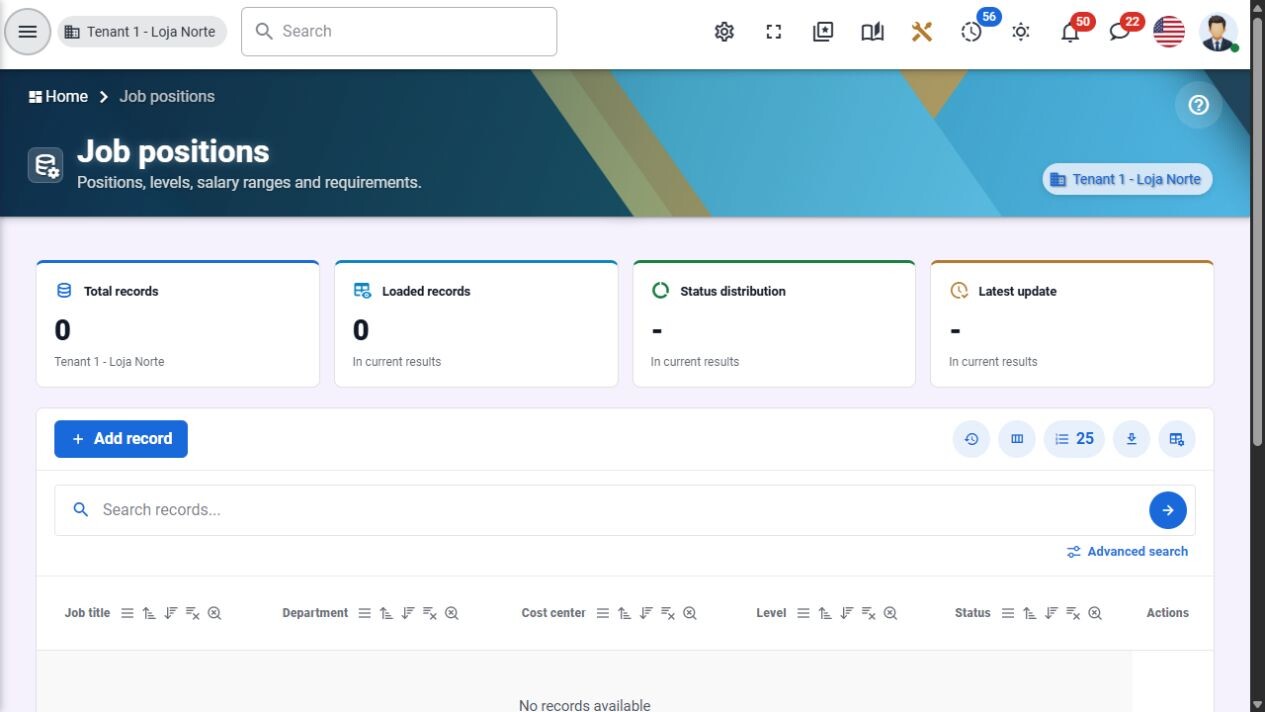
HR: positions, levels and salary ranges. English interface, development demonstration.
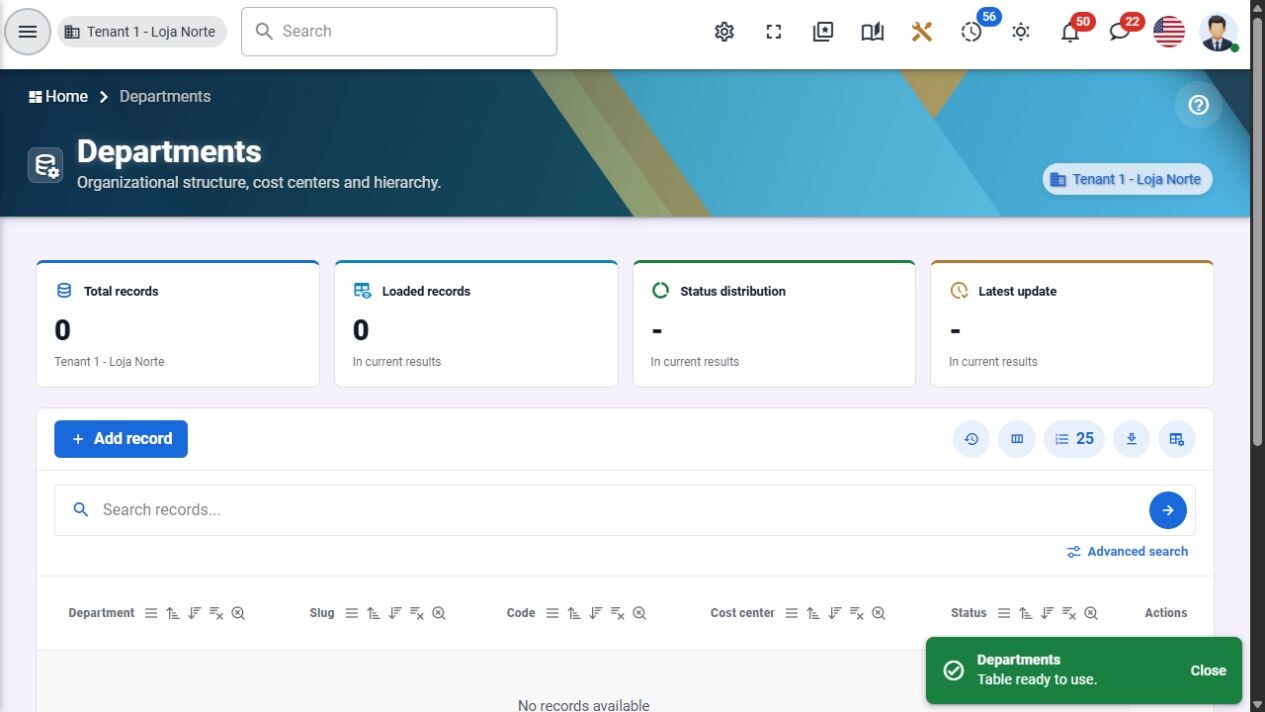
HR: organizational departments. English interface, development demonstration.
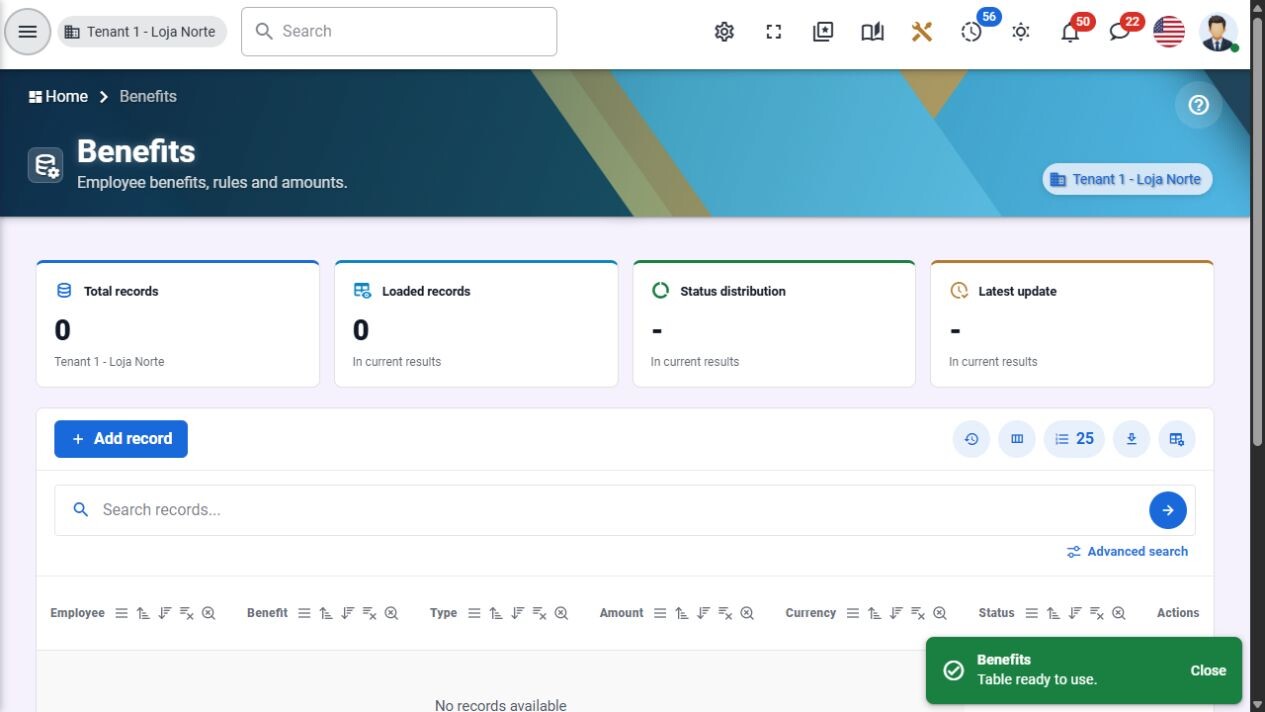
HR: benefit definitions and employee offerings. English interface, development demonstration.
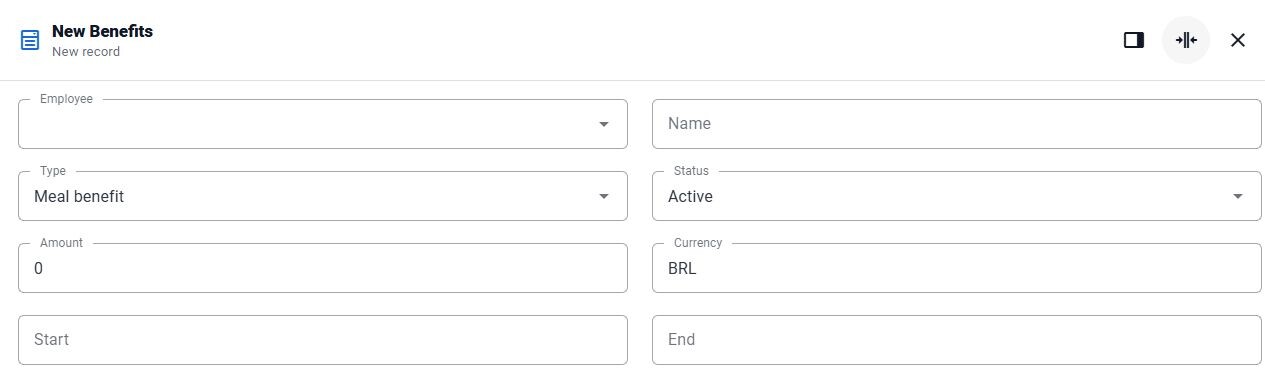
HR: benefit editor — employee, amount, currency and dates. English interface, development demonstration.
Finance and reconciliation
Follow obligations, payments and cash movements with a common audit trail.
- Receivables/payables, installments, due dates and settlements.
- Cash drawers, banks, wallets and transfers.
- Gateway operations, webhooks and idempotency patterns.
- Reconciliation batches/entries and payment approvals.
- Cost centers, allocations, collections, renegotiation and cash-flow views.
In practice: Track a payable or receivable through installments and settlement while retaining its balance and history. Cost centers, allocations and reconciliation records provide the operational context; bank/gateway execution is provider-specific.
Development focus: Implement/validate OFX and CSV statement import; Exercise real collection/gateway providers and title-to-reconciliation E2E.
Scope note: External providers require separate credentials and sandbox acceptance; the campaign does not promise universal banking compatibility.
See it in the product
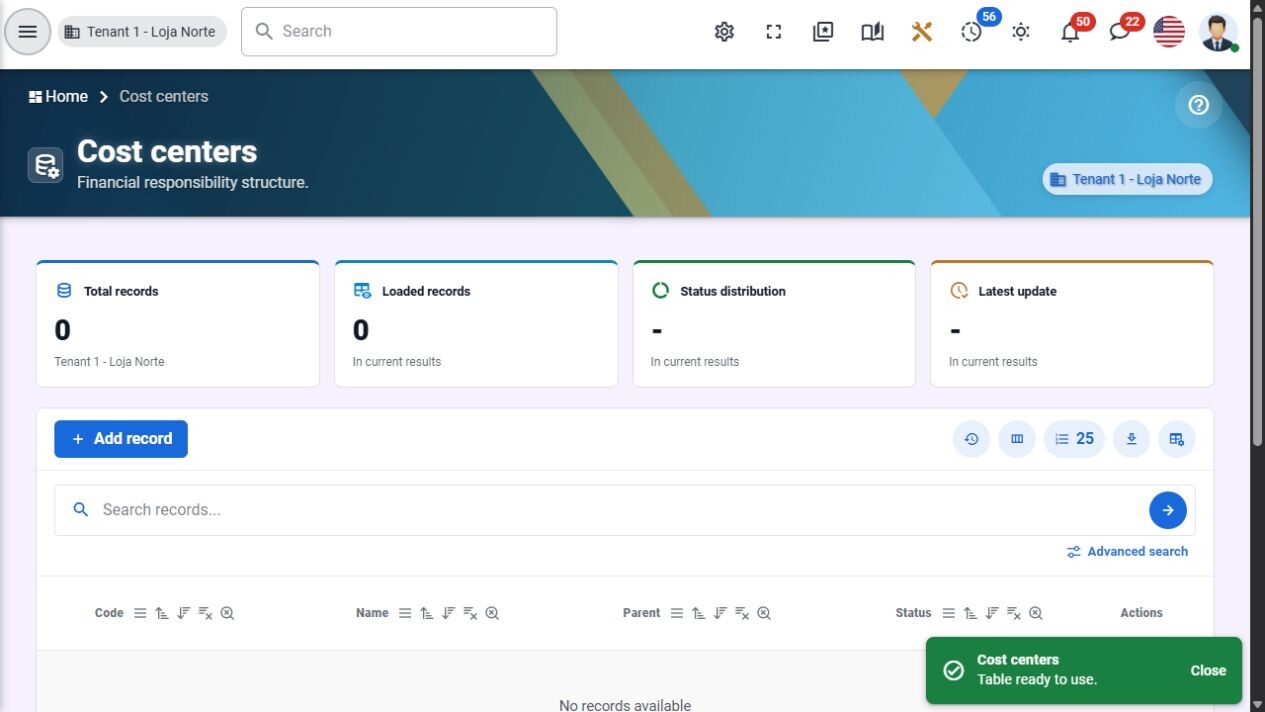
Finance: cost-center structure. English interface, development demonstration.
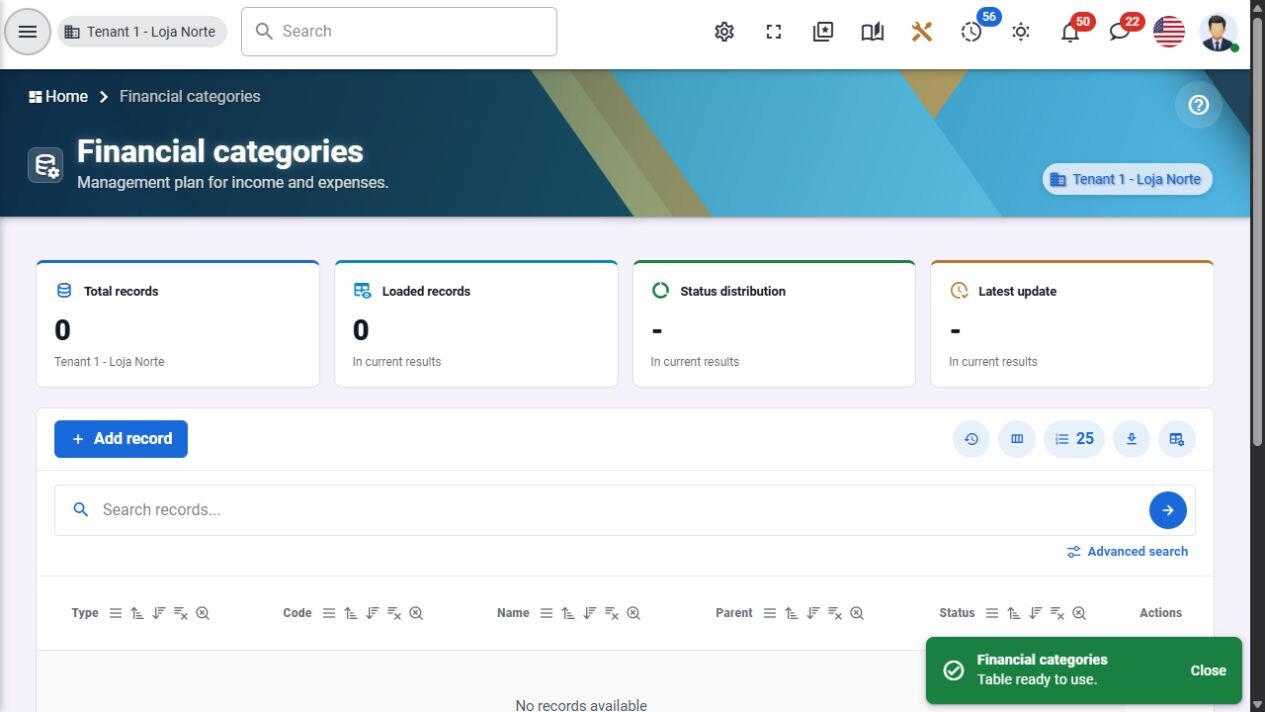
Finance: income and expense categories. English interface, development demonstration.
Fiscal documents and invoices
Keep fiscal configuration, lifecycle events and document evidence organized.
- Issuer profiles, certificate records and series.
- Tax-rule and invoice-item structures.
- Emission/cancellation/correction/contingency contracts.
- XML/PDF evidence through authenticated media.
- Tenant isolation, idempotent provider contracts and audit history.
In practice: Keep issuer settings, certificate references, document events and XML/PDF evidence in the same tenant context. Fiscal actions are represented through provider contracts; the existing local simulator is not live tax-authority certification.
Development focus: Connect and validate a real fiscal provider in its sandbox; Complete jurisdiction-specific rejection, contingency and cancellation scenarios.
Scope note: The current evidence includes local simulation. Do not offer this as a legally certified live tax-authority issuance service.
Helpdesk and knowledge base
Give customers and agents a shared, traceable support process.
- Tickets, queues, priorities and service targets.
- Requester portal and agent inbox.
- Public comments and internal notes.
- Knowledge articles and satisfaction feedback.
- History, attachments, permissions and manager indicators.
In practice: A requester follows their ticket while an agent works the authorized queue and records the resolution trail. Managers can review backlog and SLA context; the knowledge base helps make useful answers reusable.
Development focus: Run ticket-to-resolution and escalation acceptance; Validate SLA calendars, requester isolation and reporting under load.
See it in the product
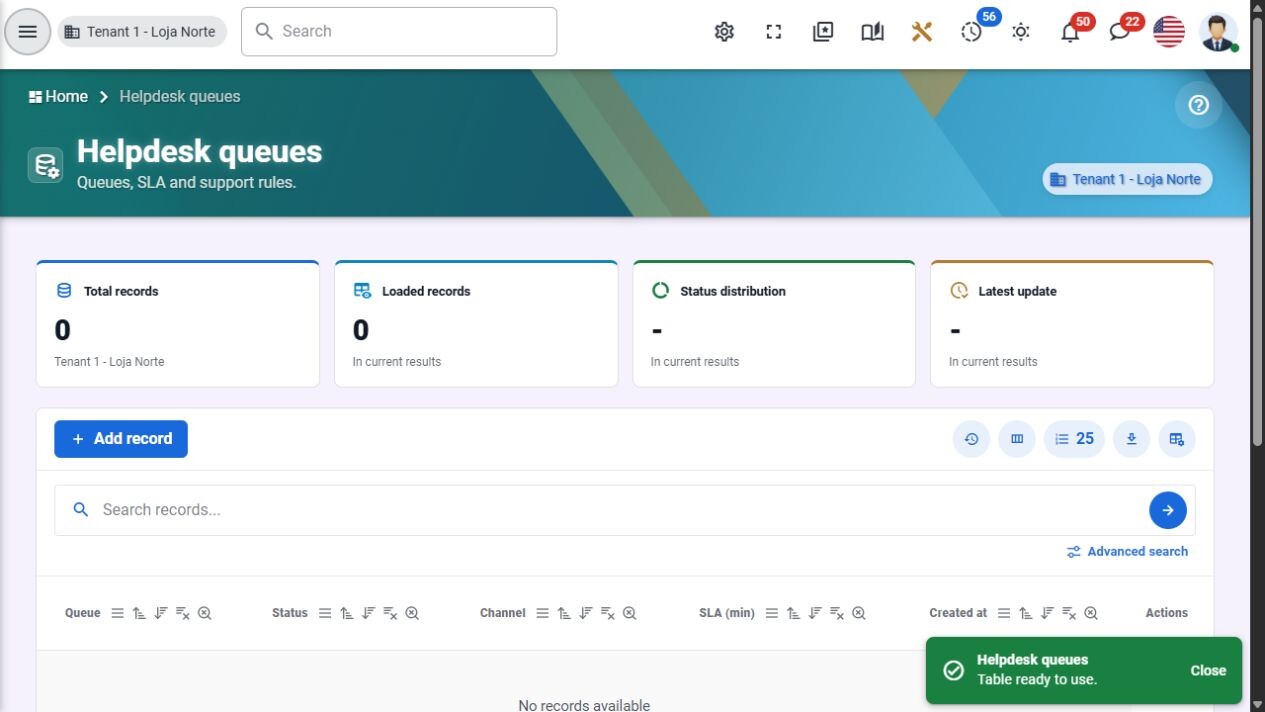
Helpdesk: support queues and service targets. English interface, development demonstration.
Contract management
Know which agreement applies, when it renews and where its evidence lives.
- Contract status, value, currency, validity and risk.
- Owners, departments, cost centers and master-party links.
- Parties and signers in labeled repeatable forms.
- Draft/signed-file versions and clause metadata.
- Renewals, notice dates and atomic initial version/schedule creation.
In practice: Store the agreement's parties, owner, value, dates and version history, then follow renewal and notice dates. The initial contract version and renewal schedule are created together, with linked parties and media checked against the organization.
Development focus: Validate renewal, version and cancellation operational cycles; Complete provider-specific signature integration if required.
Scope note: Contract-management records are not a qualified electronic-signature service. The contracts documentation folder is an alias of this module.
Projects and portfolio
Connect project commitments to the work, people and risks that deliver them.
- Portfolios and project records.
- Milestones, tasks, members and risks.
- Budgets, dates, ownership and progress.
- Contextual summaries and navigation.
- Links to Work Inbox, Tasks, Files, Approvals and Notifications.
In practice: Connect delivery milestones to owners, members, risks, budgets and dates. Project links lead back to related work and evidence, so a portfolio discussion can be grounded in the records behind its status.
Development focus: Run operational project/portfolio acceptance with real users; Validate integrated budgets, dependencies, risks and recovery paths.
Scope note: The old project-portfolio name is a historical alias. Technical validation does not grant the still-required human operational acceptance.
Store and headquarters requests
Move cross-department requests through review without losing context.
- Structured store-to-headquarters requests.
- Sales, order, price, stock and finance context.
- Comments, attachments and supporting evidence.
- Approver policies, stages and deadlines.
- Decision adapter, step-up and auditable history.
In practice: A store can submit a structured operational request with comments and attachments, then follow the headquarters decision. Separate requester, approver, reviewer and auditor views keep responsibilities explicit.
Development focus: Exercise multi-stage delegation, overdue and rejection cycles; Broaden explicit adapters and validate departmental reporting.
Content and collaboration
Media and file library
Use one file foundation across contracts, chat, tasks and operations.
- Folders, upload, preview, download and metadata.
- Authenticated asset resolution and protected URLs.
- Chunked/background upload workflows.
- Move, copy, rename, trash and restoration.
- Shared media pickers, quotas, quarantine and audit links.
In practice: Attach a stored file to a task, conversation or contract through the same picker and authorization rules. The backend resolves current file access, while trash and restoration reduce the impact of recoverable mistakes.
Development focus: Harden interruption/retry and large-file workflows; Validate external scan/storage adapters and disaster recovery.
Chat and channels
Keep conversations, files and decisions in the same work context.
- Direct conversations, groups and team/department channels.
- Scoped participant selection and media attachments.
- Emoji, reactions, presence, typing and realtime messages.
- Read/unread state, search, editing and moderation.
- Signed JSON export, retention/legal-hold controls and immutable history.
In practice: Keep direct discussions, group decisions and department channels within the organization context. Typing, presence and unread feedback help orientation, while attached media remains subject to its own access checks.
Development focus: Exercise retention, export and moderation at operational volume; Validate reconnection, attachment and mobile-accessibility cases.
See it in the product
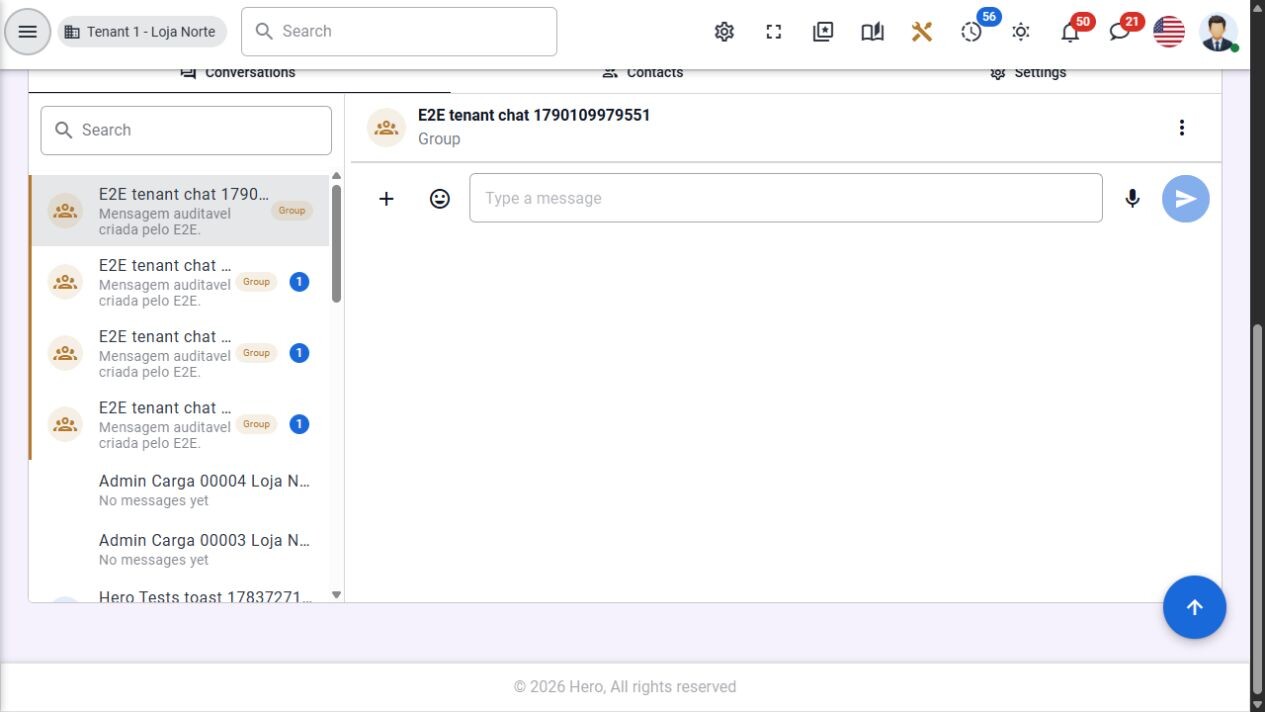
Chat: conversations, unread counters and message composer. English interface, development demonstration.
Blog and editorial publishing
Publish institutional content through an explicit editorial lifecycle.
- Hierarchical categories and tags.
- Author, excerpt, content, cover, SEO and metadata.
- Draft, review, scheduled, published and archived states.
- Public/private/protected visibility and publish/unpublish actions.
- Comments/replies, moderation, scheduler, audit and realtime updates.
In practice: An author prepares a draft, a reviewer checks it, and a scheduled or explicit publishing action makes it available under its configured visibility. Comments and replies have their own moderation actions and history.
Development focus: Complete editorial-role acceptance and scheduled-publication recovery; Improve public content templates and accessibility.
See it in the product
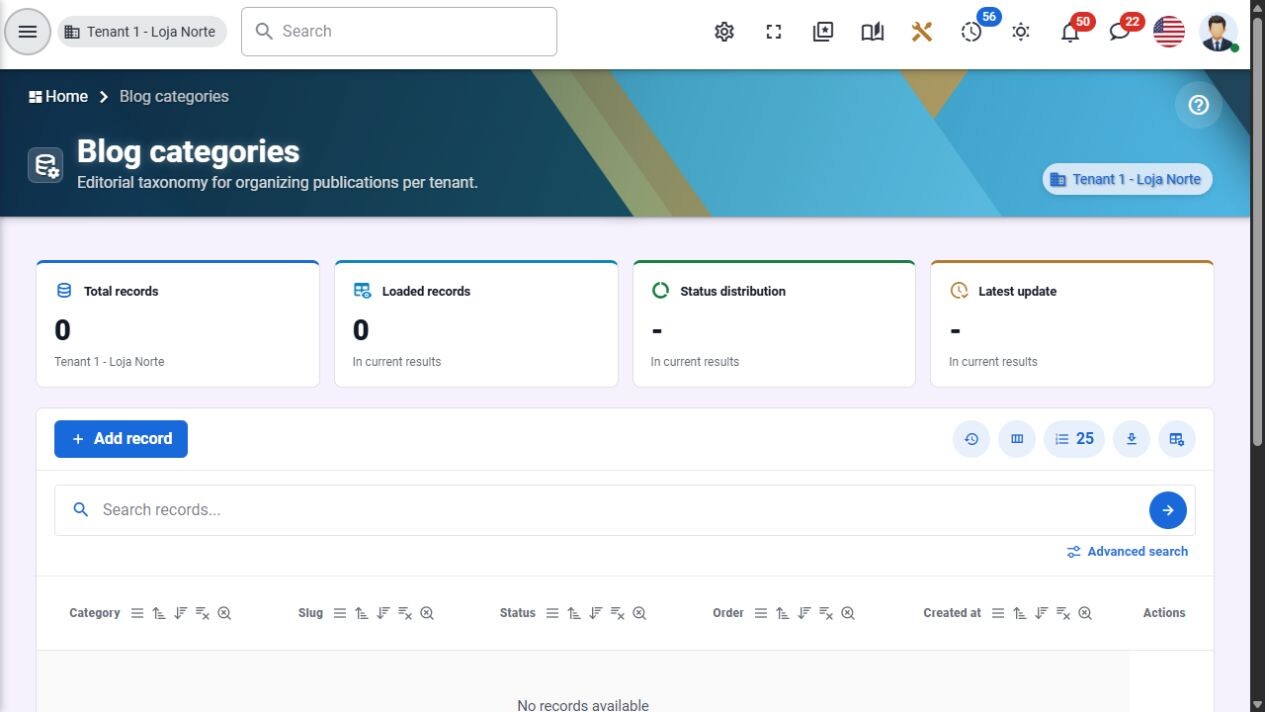
Blog: editorial categories and status. English interface, development demonstration.
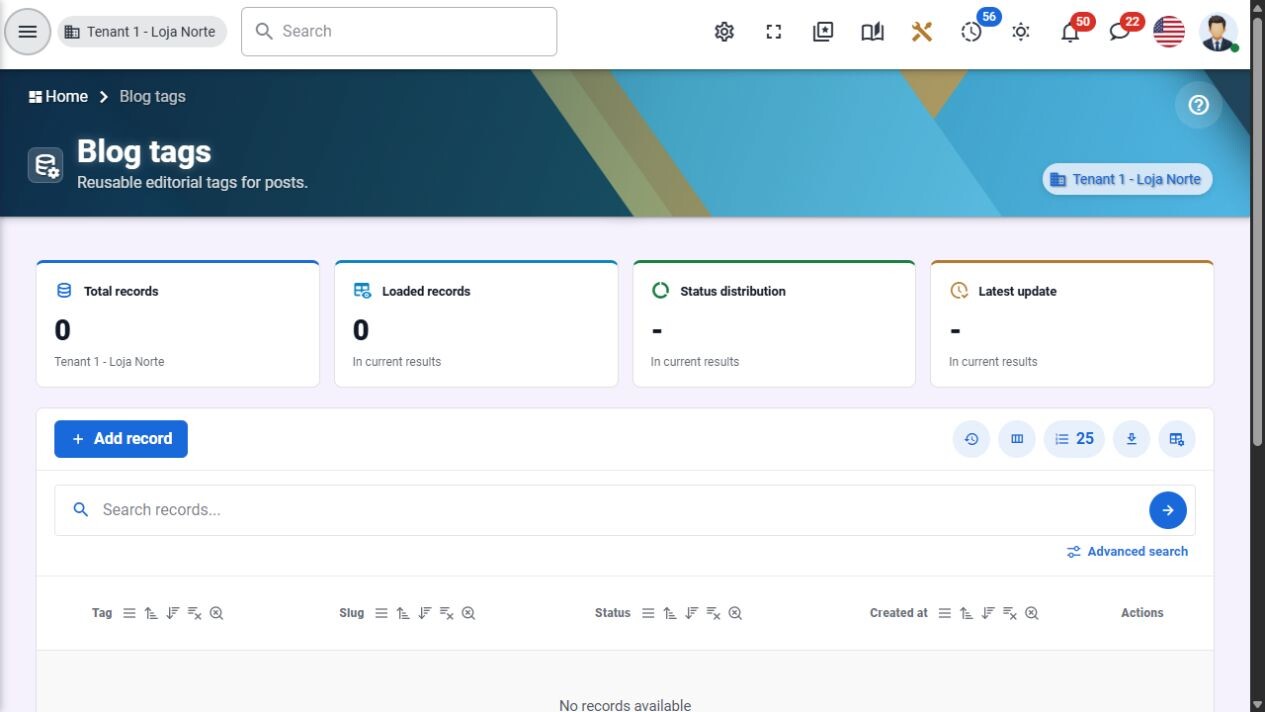
Blog: tags for reusable editorial classification. English interface, development demonstration.
The platform behind the modules
Platform Core and identity
Implemented foundation. Module manifests, scope, dependencies, lifecycle, capabilities, roles and permissions; API contracts; identity boundaries; governance and readiness.
Next: Finish adoption by every embedded area and validate release gates.
Tenant administration
Implemented foundation. Tenant domains, plans, quotas, module enablement, role/settings presets, branding, locale, onboarding, offboarding, archive/reactivation and portability.
Next: Validate complete tenant onboarding/offboarding, restores and permission-negative cases.
Settings, branding and localization
Implemented; localization incomplete. Themes, layout, density, language, regional formats, time zone, currency, calendar, translation overrides and session-lock surfaces.
Next: Remove hardcoded Portuguese and validate English across navigation, schemas, dialogs and screenshots.
Shared UI and developer foundations
Implemented foundation. BREAD/DataTables, reusable administrative shells, guided forms, dialogs, tabs, searchable menus, feedback and contextual documentation.
Next: Finish accessible keyboard/mobile flows and consistent loading/error/empty states.
Reception and scheduling
Preview / evolving integration. People, appointments, confirmations, rescheduling, month/week/day calendar, internal/external visits, reminders and service inbox surfaces.
Next: Prove persisted end-to-end scheduling and channel integrations before claiming operational completion.
Customer Success
Preview / evolving integration. Account portfolios, contacts, health/risk, NPS, journeys, cadences, renewals, expansion and playbook surfaces.
Next: Complete and demonstrate backend persistence, scoring, notifications and cross-domain workflows.
AI Center
Experimental frontend; backend planned. Assistant, prompt, knowledge, automation, evaluation, usage and settings interfaces.
Next: Add lifecycle manifest, provider abstraction, persistence, tenant isolation, redaction, cost/quotas and human-confirmation tests.
Real English interface: identity and account recovery
These authentic development captures show the account-recovery interface in English at desktop and mobile sizes. They use synthetic test values, including a recovery fixture; they contain no real account credentials. They demonstrate the interface, not a completed security certification or a guarantee that every authentication path has passed operational acceptance.
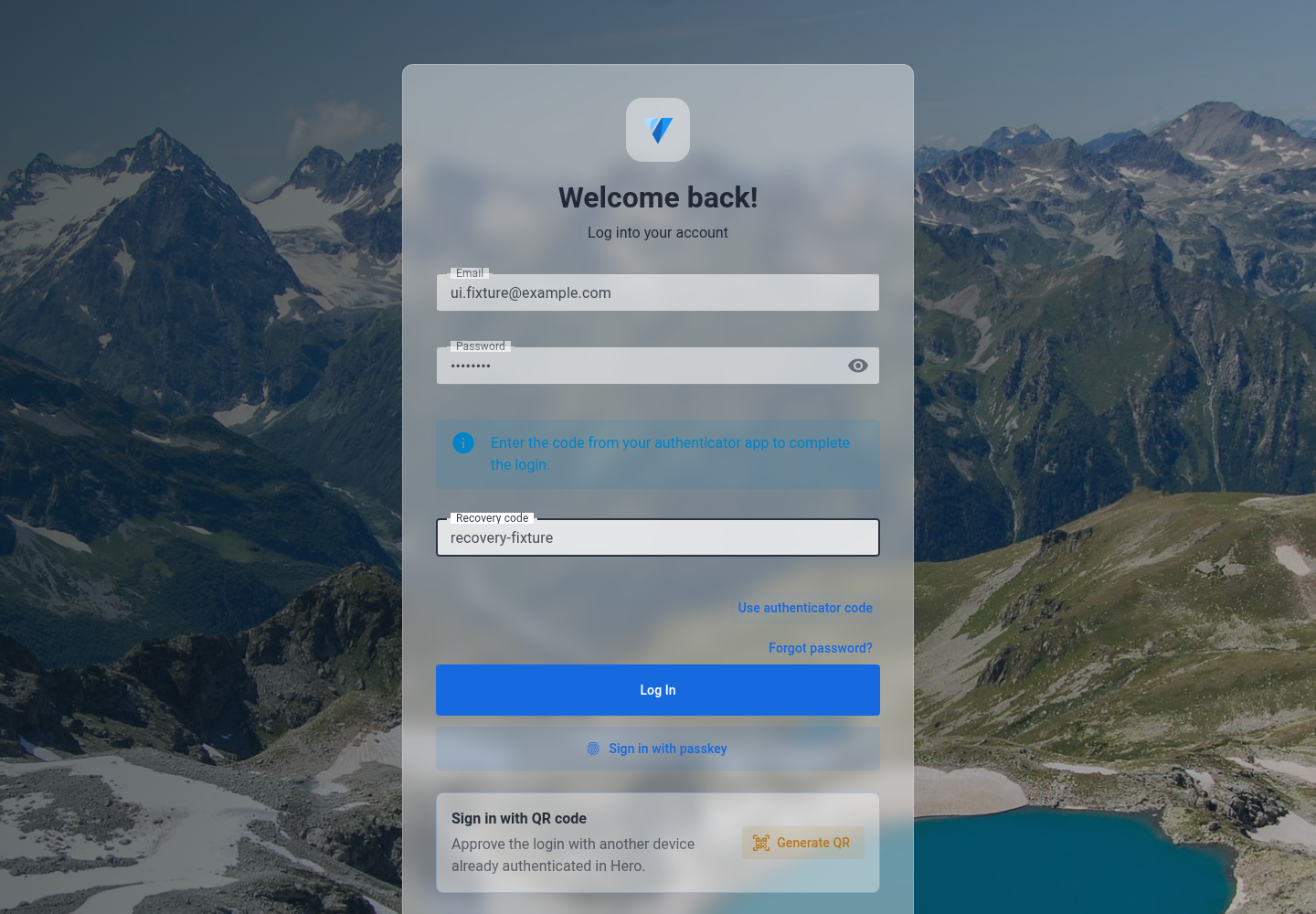
Account recovery, desktop. Original English test capture, October 3, 2026.
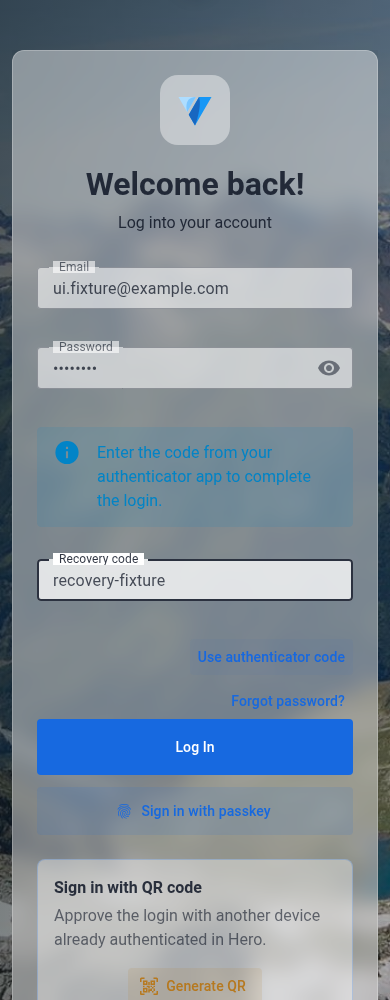
Account recovery, mobile. Original English test capture, October 3, 2026.
From a record to a finished workflow
Scenario 1: a customer order becomes coordinated work
Start with shared customer and catalog records. Build the commercial opportunity and order. Connect authorized inventory, payment and shipment records. Give the customer a portal to follow progress. Preserve approvals, exceptions and supporting files in the same context. Hero provides these domain foundations; the campaign supports deeper integration and acceptance of the complete order-to-cash path.
Scenario 2: an approval comes with its context
A store submits a request with evidence. The responsible person sees its origin, policy, stage and deadline. The decision follows the configured approval level, step-up and justification rules, then returns to the originating request through an explicit adapter. The timeline retains what happened and who acted.
Scenario 3: a publishing queue comes from structured data
A JSON document or database supplies the video path, caption and tags for each item. A reviewed flow opens the dedicated browser, selects the correct data, uploads the local file and pauses when human action is required. The generic loop can process ten records because ten were supplied—not because the same workflow was copied ten times. A real success check should capture the destination URL or ID; completing configured steps alone does not prove publication.
Hero Flow: automation that can grow with the job
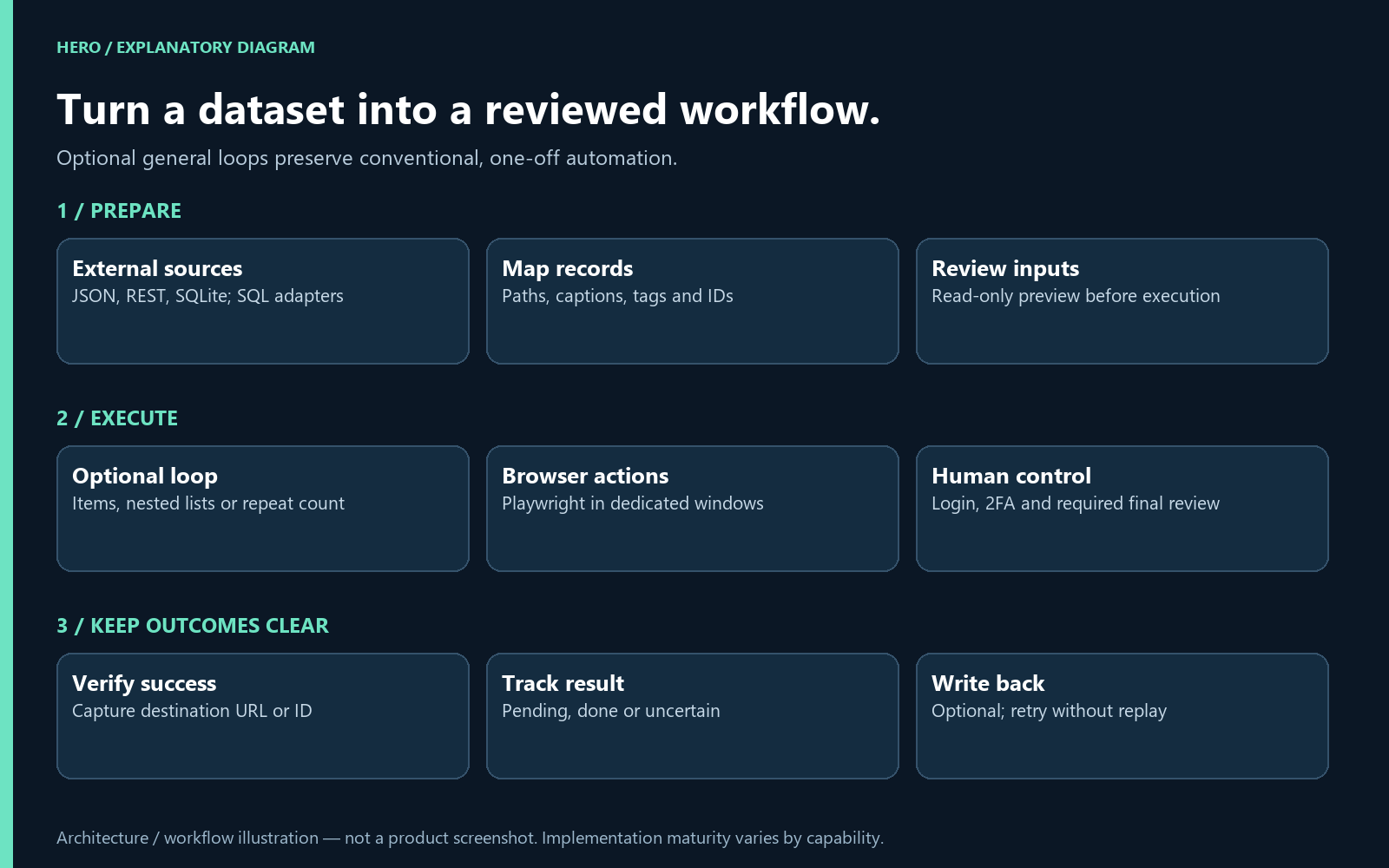
Workflow diagram: source data, reviewed execution and explicit result handling. Explanatory illustration, not a product screenshot.
Conventional one-off flows remain useful. Data sources, queues and loops are optional. Use the editor when you need code-level control and the builder when you need a sequence that is easy to inspect.
- TypeScript editing and syntax validation; configurable browser actions, waits, clicks, uploads and simulated typing.
- Real Playwright execution in dedicated browser windows, rather than assuming an extension can run unrestricted operating-system commands.
- Generic and nested loops over records, JSON lists, variables or repeat counts; parent/root/item context and collected results.
- JSON files/folders, REST and SQLite source paths; PostgreSQL/MySQL adapters are packaged but need external-server acceptance.
- Optional local queue identity, pending/completed/uncertain states and explicit review before retrying uncertain browser outcomes.
- Optional result writeback. A writeback-only retry must not repeat the browser action; destination idempotency is a shared integration responsibility.
- A Windows Companion for project-authorized files and command/service workflows, with machine-specific grants and credentials separated from exported definitions.
Browser Studio and small applications with a useful purpose
Browser Studio provides project-based editing, script/style file tabs, variables, project-scoped data helpers, REST access, global/domain execution rules, recoverable project deletion and dedicated application panels.
See Later applies that foundation to saved links: multiple lists, visual previews, read/favorite/archive states, notes, tags, search and quick context-menu access. The YouTube list project explores extension-owned video collections, watched-state synchronization, thumbnail actions, compact quick-access strips and full editing in a dedicated panel. External site markup changes, so selector and layout compatibility remain ongoing validation work.
The packaging direction is to let suitable projects become independent extensions through a versioned bundle, declared permissions and browser adapters. Chrome is the immediate validation priority for the native Companion path; broader browser coverage will be reported by capability rather than assumed.
Media preparation and assisted publishing
Embedded Playwright Builder
Implemented tooling; destination-dependent validation. Visual navigation/action steps, selectors, variables, draft/version/validation, JSON export and integration with publisher workflows.
Next: Validate each destination flow, retry/recovery and human handoff for login, 2FA, CAPTCHA and final actions.
Video Publisher
Assisted tooling; operational validation per destination. Project/language/network queues, thumbnails and descriptions, persistent browser profiles, linked Playwright flows and execution console.
Next: Resolve documentation drift, test selectors per network/account and record final-action acceptance before batch publishing.
Template-driven and verse-video workflows
Implemented tooling; content approval required. Project-specific discovery of vertical video, cover, language metadata and network descriptions; reuse of the publisher workspace and bridge.
Next: Approve a representative sample, test scanner pagination for large libraries and validate target accounts before bulk publishing.
Hero Media CLI and builder
Implemented tooling; capability-specific validation. Standalone media commands, recipes and a paired frontend command builder, FFmpeg-based processing and video-production workflows.
Next: Keep CLI/builder parity, validate generated commands and render/export workflows; expand deployment documentation.
The existing publisher project dialog below shows real language and network configuration in the development product. It is a genuine English UI capture; the proper project name remains unchanged. Choosing a destination does not mean that every destination is fully integrated.
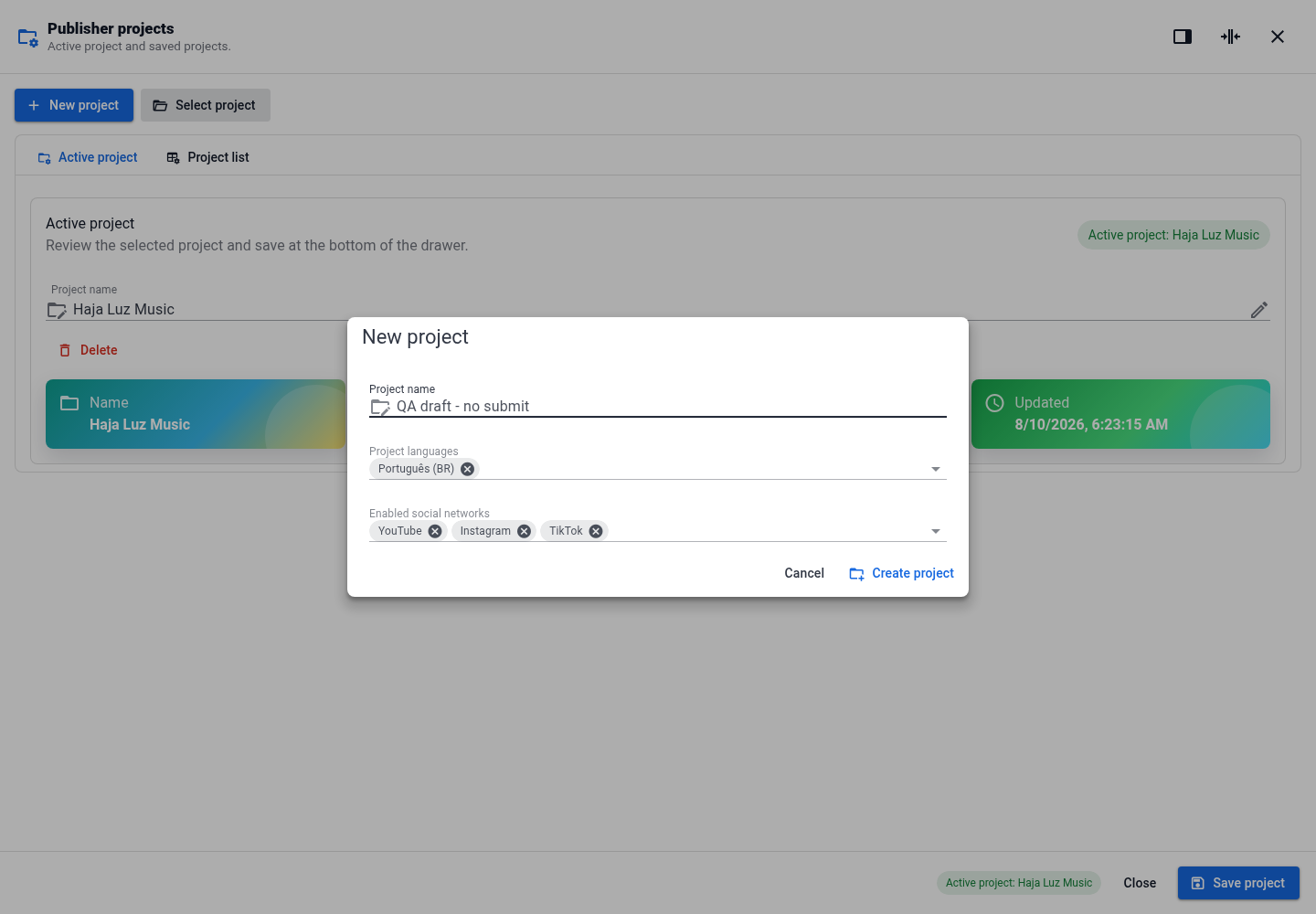
Publisher project configuration, desktop. Original English development capture, October 4, 2026.
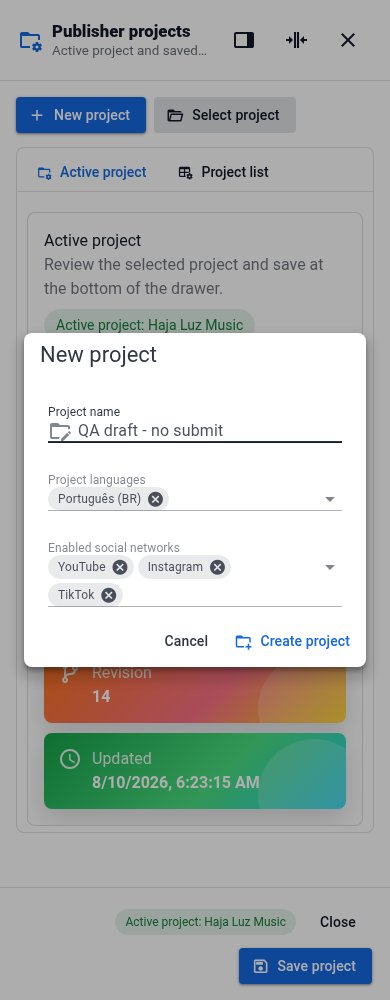
Publisher project configuration, mobile. Original English development capture, October 4, 2026. Language names and the existing project name retain their proper names.
Engineering that is worth reusing
- API-oriented architecture: consistent resource contracts, typed frontend services and provider/capability boundaries.
- Multi-company context: central administration and tenant-specific operations, with logical database isolation carried into policies, storage, background work and private realtime channels.
- Extensible operations: reusable module manifests, dependencies, permissions, readiness criteria, dashboards and lifecycle contracts.
- Observable execution: audit trails, job state, error context, health/readiness endpoints and documented API behavior.
- Validation tooling: backend contract/feature tests, frontend tests and Playwright workflows. Technical checks and real operational acceptance are tracked separately.
Current stack: PHP 8.4, Laravel 13, PostgreSQL, Valkey/Redis-compatible services, Reverb, Vue 3, TypeScript, Vuetify, Pinia and Vite. These are the current platform choices; future stack editions will be built against shared contracts.
A roadmap with clear milestones
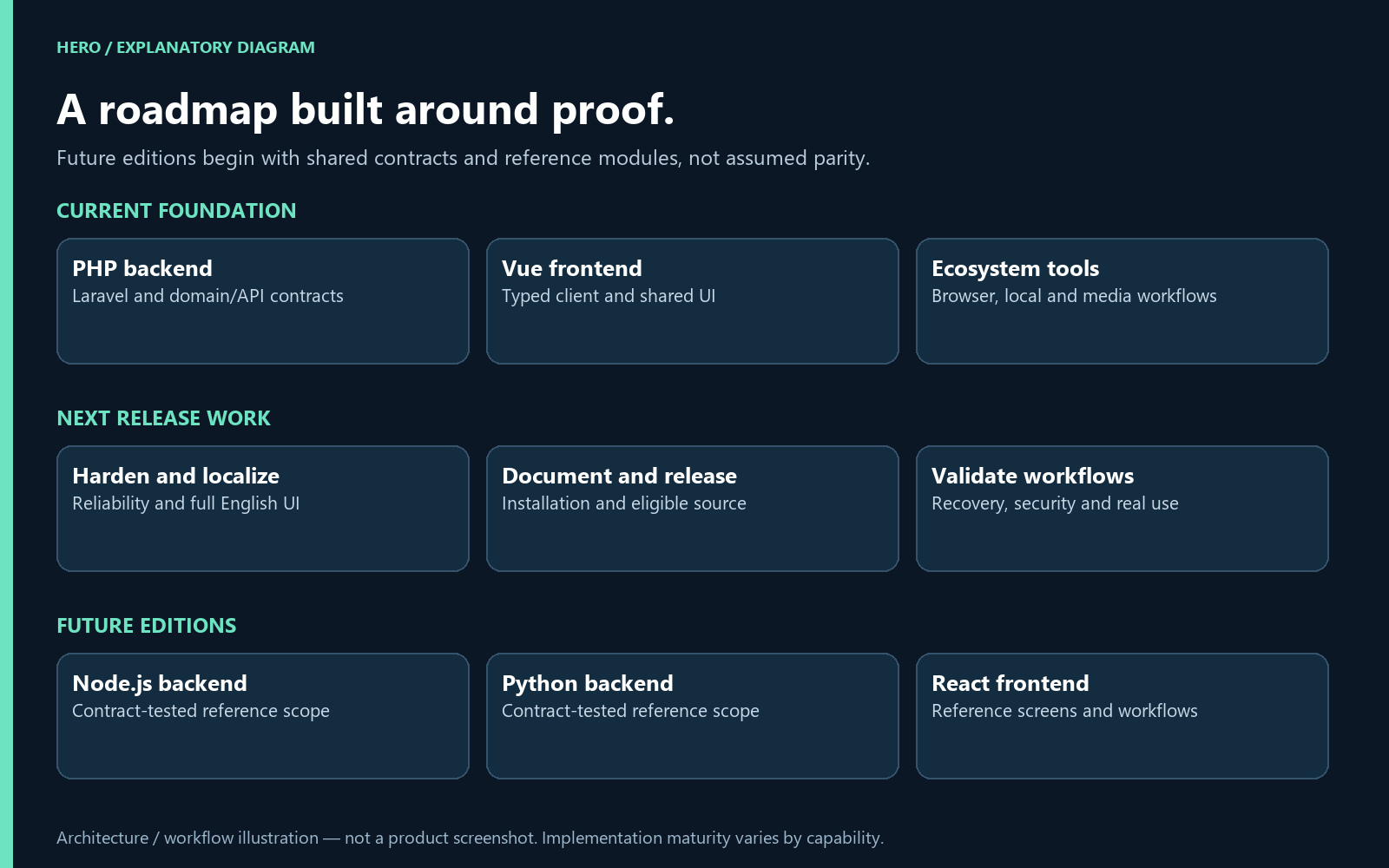
Roadmap diagram: current foundation, next release work and future stack editions. Explanatory illustration, not a product screenshot.
A source release people can actually install
Reproducible installation, migration/upgrade/rollback guidance, sample configuration without secrets, documented runtime dependencies and a known-good PHP/Vue reference environment.
What completion should look like: Fresh installation and upgrade on a clean machine, with evidence and recoverable failure paths.
Complete English product experience
Translate menus, server schema labels, role/presence labels, validation, empty states, tools and dialogs. Review tenant and platform contexts with a native UI language setting.
What completion should look like: English captures contain no unintended Portuguese fallbacks; key flows pass desktop/mobile visual review.
Reliability, isolation and operational gates
Tenant-negative tests, sensitive-field protection, permission boundaries, backup/restore exercises, worker recovery, audit coverage and documented human operational acceptance.
What completion should look like: Recorded Gates B/C/D evidence; a technical pass alone is insufficient.
A documented source-code release
Review ownership and third-party licenses, secret scanning, source-access rules, eligible release scope and installation documentation. Release remains conditional on the agreed funding milestone.
What completion should look like: A reproducible release artifact with explicit license and provenance; not merely a repository dump.
Batch and conventional automation
Keep single-run workflows while strengthening generic nested loops, external data mapping, queue identity, uncertain outcomes, result writeback and recovery without duplicate side effects.
What completion should look like: Fixtures and external sandbox examples prove single, nested, failure, cancel and writeback-only retry behavior.
Portable project-to-extension export
Versioned project package, dependency/runtime bundle, manifest generation, browser adapters, permission declaration, settings/data boundaries and installable output.
What completion should look like: Install and exercise an exported project independently of Browser Studio on each supported browser.
Real provider acceptance
Fiscal sandbox, payment/reconciliation providers, email/storage scanning adapters, carriers/maps and social-site selectors need explicit provider-specific validation.
What completion should look like: Named adapter, credentials configured by owner, documented limitations, contract tests and real sandbox/operational evidence.
Node.js backend edition
Build an alternative backend around common API contracts, authentication, tenant context, permissions, module lifecycle and reference workflows. Choose framework after a documented comparison.
What completion should look like: The funded rewrite covers the implemented PHP backend functionality, delivered module by module against shared API, authorization and tenant-isolation contracts.
Python backend edition
Bring the same domain contracts and isolation guarantees to a Python backend. Begin with shared definitions, identity, tenancy, migrations and reference modules.
What completion should look like: The funded rewrite covers the implemented PHP backend functionality, delivered in stages with matching API behavior, authorization and tenant-isolation contracts.
React frontend edition
Create an alternative client with shared typed API contracts, navigation, permission boundaries, forms, tables, themes and reference screens.
What completion should look like: The funded rewrite covers the implemented Vue frontend functionality, delivered in stages with validated navigation, permissions, forms, tables and module workflows.
Recording mode for Hero Flow
Capture intentional browser actions, derive editable steps and selectors, redact sensitive input, and let the user review before saving or executing.
What completion should look like: Recording becomes an editable draft with stable-selector fallbacks; never replay credentials or consequential actions silently.
Operational scale and business depth
Larger imports/exports, reporting recipes, module-specific dashboards, accessible keyboard/mobile workflows and richer cross-domain exception handling.
What completion should look like: Published workload/environment measurements and real user acceptance, with no unsupported blanket performance claims.
Broader browser and OS support
Chrome first for the current Companion workflow; validate Firefox and other targets through adapters, packaging tests and feature-level compatibility contracts.
What completion should look like: Named per-browser capabilities and real installation tests; avoid promising identical native side-panel behavior everywhere.
Provider-backed AI execution
Complete the AI lifecycle, internal provider contracts, persistence, quotas/cost accounting, redaction, audit and action confirmation.
What completion should look like: Real provider execution with bounded permissions and human review where required; experimental screens alone do not satisfy this milestone.
The roadmap connects each planned improvement to a concrete outcome: a working installation, validated integrations, portable automation and alternative stack editions. Progress updates will distinguish delivered capabilities from work still in development.
Your first milestone: US$5,000
This first milestone supports a focused next step: improve the current foundation, remove adoption blockers, document installation and prepare an eligible source release. It is not presented as a complete budget for every module and all future stack editions.
- US$2,250 / 45%: reliability, integration and critical regression work in the existing PHP/Vue platform.
- US$1,000 / 20%: documentation, installation examples and source-release preparation.
- US$1,000 / 20%: shared contracts and reference work for the future Node.js, Python and React editions.
- US$750 / 15%: transaction/platform costs as applicable, test infrastructure and delivery contingency.
Allocations are planning estimates and will be reported as development progresses. Each development update should connect the funding received to the work completed, the evidence produced and the next priority.
Funding milestones: PHP/Vue first, then complete alternative editions
This is an all-or-nothing campaign with a US$5,000 base goal and a 60-day funding period. Supporters are charged only if the base goal is reached by the campaign deadline. If it is not reached, pledges are not collected and reward delivery is not triggered.
Each additional edition has a US$2,000 stretch goal. These are cumulative campaign totals, not an additional charge per supporter:
- US$5,000 — PHP + Vue: prepare and deliver the existing edition with its source code, installation documentation and the funded release scope.
- US$7,000 — React frontend: unlock the rewrite of the existing Vue frontend functionality in React.
- US$9,000 — Node.js backend: unlock the rewrite of the existing PHP backend functionality in Node.js, in addition to the React milestone.
- US$11,000 — Python backend: unlock the rewrite of the existing PHP backend functionality in Python, in addition to the React and Node.js milestones.
The aim is complete alternative editions of the existing product, delivered in stages—not only a starter screen or a single demonstration module. Functional scope refers to capabilities actually implemented in the PHP/Vue baseline. Features identified elsewhere as planned, experimental or awaiting provider acceptance do not become completed features merely because a stretch goal is reached.
Reaching a stretch goal funds development; it does not mean the edition is already available. Each rewrite will progress through shared contracts, module implementation, integration and validation. Edition-specific delivery schedules and progress will be published separately; the PHP/Vue delivery estimate does not apply to the rewrites.
If a stretch goal is not reached, that edition remains outside this campaign's delivery commitment and reward entitlement. Funds above the base goal that do not unlock the next milestone support the funded work and its delivery.
Founding supporter licenses: only what is actually produced
A license covers software editions actually produced and released under the funding milestones reached by this campaign. It is not a license to every possible future Hero product or to an edition that remains unfunded or unreleased. PHP + Vue is the initial edition. React, Node.js and Python are included only if their respective cumulative funding targets are reached and the editions are produced and made available.
- US$99 — one-year updates license: access to the delivered source release and 12 months of updates for each eligible edition, starting when that edition is first made available to the supporter. Versions received during that period may continue to be used after the update period ends.
- US$199 — lifetime updates license: access to the delivered source release and future updates for eligible, produced editions for as long as those editions are maintained. Versions received may continue to be used. “Lifetime” does not promise perpetual hosting, unlimited personal services or production of unfunded editions.
Delivery estimate: the initial PHP/Vue source package and license activation are estimated within 90 days after the funding period ends and successful payments are confirmed. This estimate covers preparation of the existing funded release, not completion of the entire roadmap. New edition delivery will follow separate development schedules.
Both tiers are digital rewards. Hosting, third-party service charges, custom development and dedicated support services are not included. Source access does not automatically grant unrestricted redistribution or establish an open-source license. Third-party components retain their own license terms.
What supporters should expect
A substantial source-backed foundation, honest progress reports and a development plan that names its unfinished work. Real provider access, hardware compatibility, certified compliance and universal production readiness are not implied by a screen or a manifest. Roadmap editions and experimental AI capabilities will be described as future work until execution and acceptance are demonstrated.
The next release should be judged by working installation, coherent workflows, understandable documentation, recoverable failures and the evidence behind each milestone. That is where your contribution can make the difference.
Help move good software past the starting line
Developers should not have to rebuild the same foundations every time they want to create something useful. Hero is an investment in reusable work: the infrastructure, business patterns and automation building blocks that let the next project start further ahead.
Support Hero. Share the campaign with a builder who values their time. Help turn an extensive foundation into a stronger, more accessible development ecosystem.
Perks

Hero source access + 12 months of updates.
Includes the PHP/Vue edition produced and released after the US$5,000 base goal is reached. React is eligible at US$7,000 total funding, Node.js at US$9,000 and Python at US$11,000, only when those editions are actually produced and released.
Your 12-month update period starts separately when each eligible edition is delivered to you. You may continue using versions received after that period ends. Unfunded or unreleased editions are not included.
Initial PHP/Vue delivery is estimated within 90 days after the funding period ends and successful payments are confirmed. Funded rewrites follow separate development schedules and staged releases.
Digital delivery. No hosting, third-party bills, custom development or dedicated support services. Source access does not automatically grant unrestricted redistribution or an open-source license. If the base goal is not reached by the deadline, pledges are not collected.
Hero source access + lifetime updates for eligible editions.
Includes the PHP/Vue edition produced and released after the US$5,000 base goal is reached. React is eligible at US$7,000 total funding, Node.js at US$9,000 and Python at US$11,000, only when those editions are actually produced and released.
Updates are included for each eligible edition for as long as that edition is maintained. You may continue using versions received. Lifetime does not mean perpetual hosting, unlimited services or a promise to produce unfunded editions. Unfunded or unreleased editions are not included.
Initial PHP/Vue delivery is estimated within 90 days after the funding period ends and successful payments are confirmed. Funded rewrites follow separate development schedules and staged releases.
Digital delivery. No hosting, third-party bills, custom development or dedicated support services. Source access does not automatically grant unrestricted redistribution or an open-source license. If the base goal is not reached by the deadline, pledges are not collected.
Hero source access + 12 months of updates.
Includes the PHP/Vue edition produced and released after the US$5,000 base goal is reached. React is eligible at US$7,000 total funding, Node.js at US$9,000 and Python at US$11,000, only when those editions are actually produced and released.
Your 12-month update period starts separately when each eligible edition is delivered to you. You may continue using versions received after that period ends. Unfunded or unreleased editions are not included.
Initial PHP/Vue delivery is estimated within 90 days after the funding period ends and successful payments are confirmed. Funded rewrites follow separate development schedules and staged releases.
Digital delivery. No hosting, third-party bills, custom development or dedicated support services. Source access does not automatically grant unrestricted redistribution or an open-source license. If the base goal is not reached by the deadline, pledges are not collected.
Hero source access + lifetime updates for eligible editions.
Includes the PHP/Vue edition produced and released after the US$5,000 base goal is reached. React is eligible at US$7,000 total funding, Node.js at US$9,000 and Python at US$11,000, only when those editions are actually produced and released.
Updates are included for each eligible edition for as long as that edition is maintained. You may continue using versions received. Lifetime does not mean perpetual hosting, unlimited services or a promise to produce unfunded editions. Unfunded or unreleased editions are not included.
Initial PHP/Vue delivery is estimated within 90 days after the funding period ends and successful payments are confirmed. Funded rewrites follow separate development schedules and staged releases.
Digital delivery. No hosting, third-party bills, custom development or dedicated support services. Source access does not automatically grant unrestricted redistribution or an open-source license. If the base goal is not reached by the deadline, pledges are not collected.
